
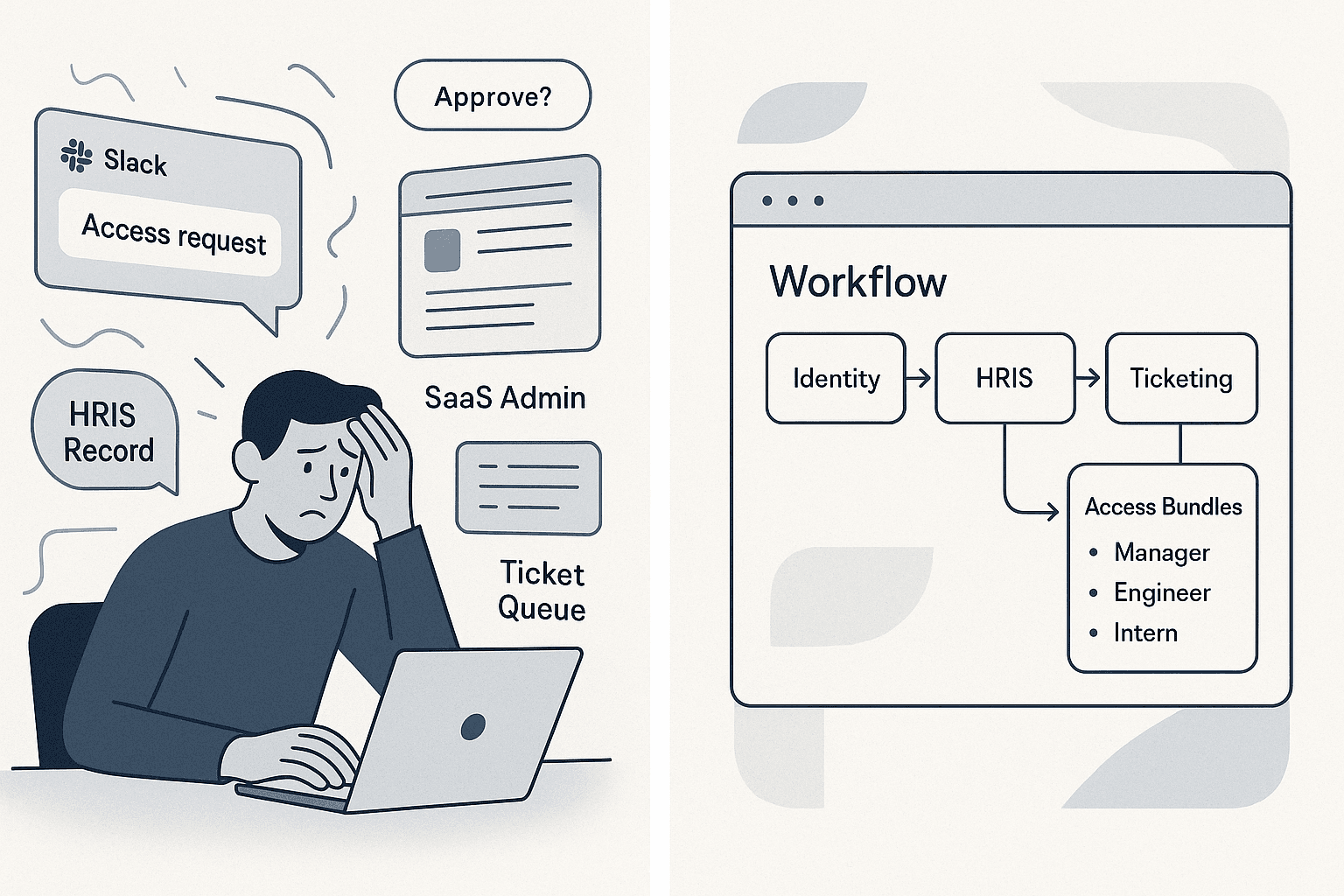
On paper, most startups think they have onboarding handled.
They have an offer letter template. They have a checklist in Notion. They have an HR system, maybe. They have Okta or Google Workspace or Microsoft Entra eventually. They have a security policy in a folder that everyone swears exists. If you ask the founders whether a new hire can start on day one, they’ll usually say yes.
Then the person actually joins.
At 8:47 a.m., the hiring manager sends a Slack message: “Can someone add Priya to Figma, Linear, and the customer Slack?” Ops asks whether Priya is a contractor or employee. Finance asks whether she needs Expensify. Engineering asks whether she needs staging access or production access. Nobody knows who owns Mixpanel admin anymore because the last growth lead left three months ago. Someone DMs the founder for approval because “that’s what we did last time.” The founder is on a plane. Priya spends half the day blocked, half the day waiting, and by week two she has more access than she should because everyone solved urgency by overprovisioning.
That’s the access request queue problem.
It looks small when you have 8 people. It becomes painful at 20. By 50, it’s one of those invisible operational failures that hits three functions at once:
- Onboarding breaks because new hires don’t get what they need on time.
- Security breaks because access gets granted without clean approval, logging, or removal.
- Speed breaks because every edge case routes through tribal knowledge, DMs, and whichever operator remembers how something worked last quarter.
Most teams don’t notice this as a single system problem. They experience it as a series of annoying incidents:
- “Why didn’t the PM have access on their first day?”
- “Why does this contractor still have Salesforce six months later?”
- “Why do managers keep asking me who approves production read-only?”
- “Why do we need the founder to bless every exception?”
- “Why are urgent access requests always emergencies?”
The root issue is simple: there’s a gap between role design and actual system access, and that gap is being managed informally.
If your role architecture says “Support Manager” but the real-world access package for that role lives in three Slack threads, two admin memories, and one spreadsheet last updated before your Series A, you do not have an access model. You have a social process held together by responsive employees.
This article is about fixing that layer without overbuilding. Not a giant IAM transformation. Not enterprise theater. A minimum viable access request system that a startup can actually run.
The failure scenario most startups recognize
Let’s make this concrete.
Imagine a 65-person startup with the following stack:
- HRIS: Rippling or BambooHR
- Identity: Google Workspace plus maybe Okta
- Ticketing: Jira Service Management, Zendesk, Freshservice, or just a form tool
- Collaboration: Slack, Notion
- Core SaaS: GitHub, Linear, Figma, HubSpot, Salesforce, NetSuite, AWS, 1Password, Mixpanel, Looker
The company has grown quickly. For the first 20 people, access was granted manually by whoever set up the tool. For the next 20, ops tried to standardize onboarding checklists. For the next 25, the company added more vendors, more contractors, and a few sensitive systems.
Now the company has four kinds of access work happening all the time:
-
New hire onboarding
People need baseline access before day one. -
Internal moves
A recruiter becomes a recruiting ops lead. A PM moves into growth. A support rep joins implementation. -
Contractor and vendor setup
Short-term people need narrow, time-bound access. -
Urgent exceptions
Somebody needs temporary access to debug, cover for PTO, support a customer issue, or run a finance process before close.
None of these are rare. Together, they form a continuous queue.
And in most startups, that queue is not managed as a queue.
Instead:
- Requests enter through Slack, email, hallway asks, calendar meetings, and direct DMs.
- Approvals come from whoever responds first.
- Admin execution is done by IT, ops, finance, engineering, or random app owners.
- Evidence lives nowhere consistent.
- Offboarding and access reviews lag because there’s no source of truth for why access was granted in the first place.
The immediate cost is wasted time. The larger cost is that your company starts relying on two dangerous defaults:
Default 1: Grant broad access to avoid blocking work
When access is messy, people solve for speed by overprovisioning.
Examples:
- Give the new marketer full HubSpot admin because nobody knows the difference between campaign permissions and admin permissions.
- Leave a contractor in the engineering org group because removing and re-adding them later is annoying.
- Put a support lead in multiple shared accounts because SSO setup is incomplete.
- Hand out production read-only widely because there’s no clean escalation path for temporary investigation access.
This feels efficient in the moment. It creates long-lived risk.
Default 2: Route exceptions through senior people
When rules are unclear, exceptions get escalated upward.
Examples:
- Founder approves customer Slack access because the sales lead “doesn’t want to make the wrong call.”
- CTO approves staging access for PMs because engineering never defined a policy.
- Head of Finance approves vendor setup ad hoc because procurement, security, and app ownership are mixed together.
This creates bottlenecks and hidden dependency on a few people who understand the system socially rather than structurally.
That is why access chaos grows faster than headcount. It compounds with every tool, every role variation, and every exception that gets solved without improving the underlying process.
The pattern underneath the mess
The access request queue problem is not primarily a tooling problem. It’s an operating model problem.
Specifically, startups usually lack five things at once:
1. Standard entitlement bundles by role
You may have job titles, but not actual access bundles.
A title like “Product Designer” is not enough unless it maps to something like:
- Google Workspace account
- Slack default channels
- Figma editor
- Notion access level
- Linear product team workspace
- 1Password vaults relevant to function
- Maybe Maze or UserTesting
- Explicitly no production, no finance, no CRM admin
Without bundles, every request becomes custom.
2. Clear app ownership
Every app should have someone accountable for:
- defining who should get access
- approving exceptions
- executing or delegating provisioning
- reviewing stale access
- updating documentation when the setup changes
In reality, many apps are “owned” by departed employees, shared aliases, or vague functions like “growth.”
3. Defined approver logic
Approvals often break because nobody has decided which requests need:
- manager approval
- app owner approval
- data owner approval
- security approval
- finance approval
- no approval at all if it’s part of a standard role bundle
Without clear logic, every request becomes a mini governance debate.
4. Turnaround expectations
Most startups have no SLA for access requests.
That means everything is either:
- treated as urgent, which burns operators out, or
- treated as non-urgent, which delays starts and blocks work
A queue without service levels becomes a political system. The loudest manager wins.
5. Exception handling and logging
Exceptions aren’t the problem. Unlogged exceptions are.
You will absolutely need temporary access, emergency access, cross-functional coverage, and one-off approvals. The issue is when there’s no record of:
- who requested it
- who approved it
- why it was needed
- when it should expire
- whether it was removed
That’s how temporary access becomes permanent institutional drift.
Why standard advice fails
If you ask around for best practices, you’ll usually hear one of three unhelpful answers.
“Just buy an identity platform and automate provisioning”
Eventually, yes, automation matters.
But automation on top of undefined access logic just scales confusion faster.
If you haven’t defined bundles, owners, approvers, and exceptions, then automated provisioning becomes:
- incomplete for edge cases
- brittle for internal moves n- dangerous for inherited group mappings
- frustrating because manual backchannels still exist
You can absolutely use Okta, Entra, Rippling, JumpCloud, BetterCloud, Torii, Lumos, or similar tools. But they won’t decide your entitlement model for you.
“Just centralize it with IT or ops”
This sounds practical and often starts well.
Then the IT or ops person becomes the human API for every app in the company.
That creates a few problems:
- They become a bottleneck.
- They end up making policy calls they shouldn’t own.
- Business teams stop learning their own access model.
- Every request requires custom interpretation.
Central coordination is good. Central decision-making for every request is not scalable.
“Just document the onboarding checklist”
Checklists are useful, but onboarding is only one quarter of the problem.
If your checklist covers day-one access but ignores:
- role changes
- temporary elevated access
- contractor onboarding
- leave coverage
- termination timing
- app-specific exception rules
then you have documented a slice of the workflow, not the system.
The deeper issue is that access is lifecycle management, not just onboarding administration.
A better approach: build a minimum viable access request system
What works in startups is not enterprise-perfect IAM. It’s a minimum viable access request system with enough structure to remove chaos and enough flexibility to handle real work.
The design principle is simple:
Standardize the common path. Make exceptions explicit. Route everything through one intake.
That means building six components.
1. Create role-based entitlement bundles
Start with your most common roles, not every edge case.
A practical first pass usually covers 70–80% of requests with 10–20 bundles.
Example bundles:
- Engineering Individual Contributor
- Engineering Manager
- Product Manager
- Product Designer
- Customer Support Rep
- Customer Success Manager
- Account Executive
- Marketing Generalist
- Finance Employee
- Recruiting Coordinator
- Contractor: Engineering
- Contractor: Design
- Executive
For each bundle, define:
- apps included
- permission level in each app
- whether access is automatic or optional
- whether additional approval is needed for a subset
- whether the bundle is employee-only or contractor-eligible
A simple table works.
| Role Bundle | App | Access Level | Default? | Extra Approval? | Notes |
|---|---|---|---|---|---|
| Product Manager | Google Workspace | Standard | Yes | No | Core identity |
| Product Manager | Slack | Standard | Yes | No | Add product channels |
| Product Manager | Notion | Member | Yes | No | Product docs |
| Product Manager | Linear | Member | Yes | No | Product workspace |
| Product Manager | Figma | Viewer | Yes | No | Upgrade if needed |
| Product Manager | Mixpanel | Viewer | Yes | No | No admin |
| Product Manager | Looker | Explorer | Optional | Manager | If analytics-heavy |
| Product Manager | AWS | None | No | CTO | Exception only |
Two rules matter here:
Keep the first version blunt
Do not spend six weeks arguing about every sub-role permutation.
You do not need separate bundles for:
- Senior PM, PM II, Growth PM, Platform PM, AI PM, Principal PM
if 90% of their access is the same.
Start with function-level bundles plus a few variants where risk is materially different.
Separate baseline from elevated access
Do not bury sensitive access inside standard bundles.
Examples of elevated access:
- production systems
- finance systems with approval power
- CRM admin
- identity admin
- payroll
- security tools
- customer data exports
Baseline should get people working. Elevated access should trigger extra review.
2. Define app owners and decision rights
Every app needs an owner. Not a vague department. A named accountable role.
Your app owner matrix should include:
- App name
- Business owner
- Technical/admin owner
- Backup owner
- Default eligible roles
- Sensitive permissions requiring extra approval
- Provisioning method
- Review cadence
Example:
| App | Business Owner | Admin Owner | Backup | Sensitive Access | Provisioning Method |
|---|---|---|---|---|---|
| Salesforce | Head of Sales Ops | RevOps Admin | CRO delegate | Admin, exports | Manual via ticket |
| GitHub | VP Eng | IT Admin + Eng Platform | CTO delegate | Org admin, prod repos | SCIM/group |
| Figma | Design Director | IT Admin | Product Ops | Editor seats | Manual/SSO group |
| NetSuite | Controller | Finance Systems Admin | CFO delegate | Approvals, admin | Manual only |
| AWS | Platform Eng | Platform Eng | CTO delegate | Console, prod roles | IAM workflow |
The point is not to create bureaucracy. The point is to stop every request from becoming detective work.
Decision rights should be equally explicit.
For example:
- Standard bundle access: no extra approval beyond hiring manager request
- Optional but low-risk app access: manager approval
- Sensitive app access: app owner approval
- Sensitive data or production access: app owner + security or senior technical owner
- Finance/payment access: finance owner approval
- Emergency break-glass: designated on-call approver, auto-expiring if possible
When this is clear, ops can coordinate instead of deciding.
3. Build one intake path for all access requests
If access requests can originate anywhere, they will.
You need one front door.
This can be simple:
- Jira Service Management form
- Zendesk/Freshservice service catalog item
- Airtable form plus automation
- Notion form into a ticket queue
- Google Form if you’re still early, though it’s limited
The tool matters less than the discipline.
Every request type should enter the same system:
- New hire onboarding
- Role change
- Contractor setup
- Additional app access
- Temporary elevated access
- Offboarding/change removal request
Required fields should include:
- Request type
- User name
- Employment type: employee/contractor/vendor
- Manager
- Department
- Role bundle requested
- Specific app(s) if outside bundle
- Business justification
- Start date
- End date if temporary
- Cost center if relevant
- Data sensitivity or environment if relevant
- Requested approver if nonstandard
This does a few important things immediately:
- creates a visible queue
- reduces ambiguity
- creates auditable history
- makes bottlenecks measurable
- gives you data to improve bundles over time
The biggest mistake here is letting Slack remain a parallel intake lane.
Slack can notify. Slack cannot be your system of record.
A good policy is:
- Questions can happen in Slack.
- Requests must become tickets.
- No ticket, no work, except clearly defined emergencies.
4. Set turnaround SLAs by request type
Without SLAs, every request is politics.
You need lightweight expectations, not enterprise contracts.
Example startup SLA model:
| Request Type | SLA Target | Notes |
|---|---|---|
| Standard onboarding bundle | Completed before start date | Submitted 3 business days ahead |
| Standard role-change bundle | 1 business day | If no elevated access |
| Low-risk app add | 1 business day | Manager-approved |
| Sensitive app access | 2 business days | App owner approval required |
| Temporary emergency access | 2 hours during business hours | Must include expiry |
| Contractor setup | 2 business days | Requires sponsor + end date |
| Offboarding critical revocation | Same day / immediate | Identity and key systems first |
These don’t just help requesters. They protect operators.
Now when someone pings “urgent access needed,” you can respond with:
- Is this standard, sensitive, or emergency?
- Was a ticket submitted?
- Does it meet the emergency criteria?
- What’s the stated end date?
That turns chaos into managed prioritization.
Also define what counts as an emergency. If everything is emergency, nothing is.
Reasonable emergency criteria might include:
- production incident response
- finance close blocker
- customer-impacting issue
- legal/compliance deadline
- same-day start caused by internal company error
“Manager forgot to request access earlier” is not usually an emergency. Treating it as one trains bad behavior.
5. Log and constrain exceptions
Exceptions are where access systems decay.
So don’t fight exceptions. Instrument them.
Every exception should capture:
- request reason
- approver name
- approval timestamp
- exact scope granted
- start time
- expiry time or review date
- who executed the change
- confirmation of removal, if temporary
This is especially important for:
- production access
- customer data exports
- finance approvals
- identity admin rights
- shared mailbox access
- temporary role coverage
- contractor access beyond standard scope
A practical rule: if the access would be awkward to explain in a future audit or incident review, it needs explicit logging.
Even if you’re not SOC 2 yet, act like future-you will need the paper trail. Because they will.
6. Connect your systems in the right order
Startups often try to integrate everything at once. Don’t.
Connect systems in a sequence that reduces manual work without hiding bad process design.
Recommended order:
Phase 1: HRIS as source of joiner/mover/leaver events
At minimum, your HRIS should hold:
- legal name
- personal/work email
- employment type
- department
- manager
- start/end date
- location
- role/title
If your HRIS data is sloppy, every downstream access workflow will be sloppy too.
Phase 2: Identity provider for core account lifecycle
Use your identity layer to manage:
- primary account creation
- MFA enforcement
- group membership
- app assignment where possible
- suspension/deactivation on termination
Common setups:
- Google Workspace only for very early teams
- Okta + Google Workspace
- Entra + Microsoft stack
- JumpCloud for smaller IT teams
- Rippling device + identity orchestration for SMB/midmarket
Phase 3: Ticketing/service management for request orchestration
The ticketing layer should own:
- intake forms
- routing
- approvals
- status tracking
- SLA reporting
- exception log
This is the backbone of the queue.
Phase 4: SaaS admin workflows and automation
Once bundles and approvals are clear, automate:
- group-based provisioning
- app assignment
- deprovisioning on end date
- temporary access reminders
- recertification tasks
Automation examples:
- HRIS new hire -> identity account -> default groups -> baseline apps
- Role change ticket -> manager approval -> group change -> app changes
- Contractor account with end date -> auto-create limited account -> expiry reminder -> suspend at end date
- Temporary prod access -> app owner approval -> manual grant -> scheduled removal task
This sequence matters.
If you automate before you define the request and approval logic, you just build a faster broken system.
Tool comparisons: what to use at different stages
There’s no universal stack, but there are sane choices by maturity.
Option A: Lightweight startup stack
Best for: 10–40 people, low compliance pressure, one ops/IT generalist
Components:
- HRIS: BambooHR, Rippling, Gusto with add-ons
- Identity: Google Workspace or JumpCloud
- Intake: Airtable/Jira/Google Form
- Documentation: Notion
- Passwords: 1Password
Pros:
- cheap
- fast to implement
- flexible
- enough for baseline control
Cons:
- more manual app provisioning
- weaker approval chains
- reporting can be messy
- easy to let exceptions drift outside the system
Rough cost:
- HRIS: variable, often $6–20+/employee/month equivalent
- Identity: Google Workspace or JumpCloud per user
- Ticketing/form tools: low to moderate
- Labor: 4–10 hours/week of admin once volume grows
Option B: Operationally mature SMB stack
Best for: 40–150 people, growing SaaS sprawl, SOC 2 pressure
Components:
- HRIS: Rippling, BambooHR, HiBob
- Identity: Okta or Entra
- Ticketing: Jira Service Management, Freshservice, Zendesk service workflows
- SaaS management/automation: BetterCloud, Torii, Lumos, or native workflow tools
- Documentation: Notion/Confluence
Pros:
- stronger lifecycle control
- better group provisioning
- cleaner approvals
- better auditability
Cons:
- more expensive
- setup quality matters a lot
- can create false confidence if role design is weak
Rough cost:
- Identity + ticketing + automation can become meaningful software spend quickly
- But usually cheaper than repeated onboarding delays, security cleanups, and operator overhead once you pass ~50 employees
Option C: Security-forward stack
Best for: regulated startups, enterprise sales, high sensitivity environments
Components:
- HRIS with strong lifecycle events
- Okta/Entra with SCIM/SAML broadly deployed
- Formal ITSM tooling
- PAM or privileged access workflows for production/admin access
- Endpoint management tied to identity
- Access review tooling
Pros:
- better control over elevated access
- cleaner evidence for audits
- lower founder dependency
Cons:
- heavier process
- risk of overengineering too early
- more admin overhead if business ownership is not clear
The mistake is not choosing a “less mature” stack early. The mistake is pretending ad hoc Slack plus heroics is a stable operating model.
A practical workflow that actually works
Here’s a minimum viable workflow for each access category.
Workflow 1: New hire onboarding
- HR enters employee with start date, manager, department, employment type, and role bundle.
- Ticket auto-generated 5 business days before start.
- Identity account created automatically or by IT.
- Baseline bundle assigned via groups.
- Optional apps listed in ticket for manager confirmation.
- Sensitive access items routed to app owner approval.
- Completion checked 1 business day before start date.
- New hire receives login instructions and MFA steps.
Key improvement over ad hoc method:
- manager is choosing from predefined access, not inventing it from memory
- exceptions are visible before day one
- ops has a predictable queue
Workflow 2: Internal move
- Manager submits role-change request with effective date.
- Ticket shows current bundle vs target bundle.
- System generates add/remove delta.
- Sensitive adds go for approval.
- Deprecated access removed on effective date unless exception is documented.
- User and manager receive confirmation of changes.
This is where many startups fail badly. They add new access but forget to remove old access.
Internal moves are one of the biggest sources of privilege accumulation.
Workflow 3: Contractor setup
- Sponsor submits contractor request with company, function, systems needed, and end date.
- Request must use contractor-specific bundles, not employee bundles.
- Identity account created in constrained group.
- Access is granted only to named apps in bundle.
- End date triggers review/removal workflow automatically.
Non-negotiable rule: contractor access must have an expiry date.
If the sponsor can’t provide one, set a short default review period like 30 or 60 days.
Workflow 4: Temporary elevated access
- Requester submits temporary access form with incident/project reason.
- Required fields include exact scope and expiry time.
- App owner or designated approver approves.
- Admin grants access.
- Removal task is created immediately at time of grant.
- Ticket is only closed after removal confirmation.
The key here is that temporary access should create its own removal obligation automatically.
Otherwise “temporary” means “until someone remembers.”
Cost and time analysis: what this actually saves
Founders often resist this work because it sounds like internal plumbing. It is. But the ROI is real.
Let’s do simple math for a 75-person startup hiring 4 people per month, with moderate internal mobility and contractor usage.
Assume current state:
- 90 minutes of ops/admin time per onboarding chasing requests and approvals
- 60 minutes of manager time clarifying missing access
- 2–4 hours of lost productivity per new hire on day one/week one due to missing tools
- 6–10 ad hoc access requests per week through Slack
- 1–2 significant cleanup events per month from wrong/stale access
Conservative monthly cost:
- 4 hires x 1.5 hours ops = 6 hours
- 4 hires x 1 hour manager = 4 hours
- 4 hires x 3 hours lost productivity = 12 hours
- 30 ad hoc requests x 15 minutes coordination = 7.5 hours
- 2 cleanup events x 2 hours = 4 hours
Total: ~33.5 hours/month, not counting security risk, employee frustration, or delays in sensitive teams.
At fully loaded blended labor cost, this is already material. And more importantly, it scales poorly.
After implementing a minimum viable access system, you might reduce to:
- 30–45 minutes ops per onboarding
- 15 minutes manager review for standard roles
- under 1 hour lost productivity for most hires
- ad hoc requests cut in half or more
- cleanup events reduced because access has source tickets and expiries
That can reasonably save 10–20+ hours/month at this size, plus reduce error rates.
The hidden upside is that you stop training the company that basic operating discipline is optional.
Implementation plan: 30, 60, 90 days
You do not need a six-month project.
First 30 days: make the mess visible
Goals:
- establish one intake path
- document top roles and top apps
- name owners
Actions:
- Pull a list of all current SaaS tools and system owners.
- Identify top 15–20 apps by frequency and sensitivity.
- List your top 10 recurring role types.
- Create first-pass entitlement bundles for those roles.
- Stand up a ticket form for all access requests.
- Publish a simple policy: all requests go through the form.
- Define emergency request criteria.
- Set basic SLAs.
Deliverables:
- access request form
- app owner matrix
- role bundle table v1
- emergency access policy
This alone will improve things significantly.
Days 31–60: standardize approvals and lifecycle workflows
Goals:
- remove ambiguity from common decisions
- cover movers and contractors
- reduce Slack-based approvals
Actions:
- Add approval routing logic by request type.
- Build role-change workflow with add/remove deltas.
- Create contractor-specific bundles and mandatory expiry fields.
- Create temporary elevated access template.
- Add exception logging fields.
- Train managers and app owners on decision rights.
Deliverables:
- approval matrix
- mover workflow
- contractor workflow
- temporary access process
- exception register
Days 61–90: automate high-volume paths
Goals:
- reduce repetitive manual work
- improve deprovisioning and time-bound removal
Actions:
- Connect HRIS events to ticket creation.
- Map baseline bundles to identity groups.
- Automate standard app assignment where supported.
- Set reminders for temporary access expiry.
- Build monthly report on aging tickets, emergency volume, and exceptions.
- Review stale bundles and app ownership gaps.
Deliverables:
- automated joiner ticket creation
- group-based baseline provisioning
- expiry reminder automation
- access operations dashboard
Do not automate edge cases first. Automate high-volume, low-ambiguity workflows.
Metrics that tell you whether it’s working
If you can’t measure the queue, you can’t improve it.
Track:
- % of new hires fully provisioned before start date
- median time to complete standard access request
- median time to complete sensitive access request
- % of requests submitted outside official intake path
-
of emergency access requests per month
- % of temporary access requests with expiry and confirmed removal
-
of role changes with access removal completed on time
-
of apps without named owner
-
of stale open access tickets past SLA
Good signs:
- fewer Slack pings
- fewer founder escalations
- fewer “who approves this?” questions
- less overprovisioning as default workaround
Bad signs:
- emergency volume rising
- contractor access aging without review
- role changes adding but not removing entitlements
- multiple apps still owned informally
Common tradeoffs and where to be strict
Startups should be pragmatic, but not naive.
Here’s where you can stay lightweight:
- role bundles can start broad
- the intake system can be simple
- not every app needs deep automation at first
- some approvals can be email/ticket based rather than workflow-engine fancy
Here’s where you should be strict early:
- one request intake path
- named app ownership
- no sensitive access hidden in standard bundles
- contractor expiry dates
- temporary elevated access logging
- removal on internal moves and offboarding
If you only enforce a few rules, enforce those.
The founder-level takeaway
The access request queue problem looks administrative until it doesn’t.
Then it becomes:
- a new hire who starts with a bad first impression
- a manager who can’t move fast because every request is bespoke
- an ops lead buried in Slack approvals
- a security hole nobody intended to create
- a compliance scramble six weeks before a big customer audit
- a company that still depends on founders to resolve routine access questions
This is one of those startup systems that quietly determines whether your company feels crisp or chaotic from the inside.
The right answer is not to jump straight to enterprise identity architecture. The right answer is to build a minimum viable access request system:
- standard bundles for common roles
- clear app owners and approval logic
- one queue for all requests
- SLAs by request type
- logged, time-bound exceptions
- sane integrations across HRIS, identity, ticketing, and SaaS admin workflows
Do that, and access stops being a DM-driven scavenger hunt.
More importantly, you remove one of the most common ways startups accidentally trade speed for fragility.
Because the real goal is not tighter process for its own sake.
It’s letting the company move quickly without requiring tribal knowledge, constant interruptions, or unnecessary risk every time someone needs the tools to do their job.