
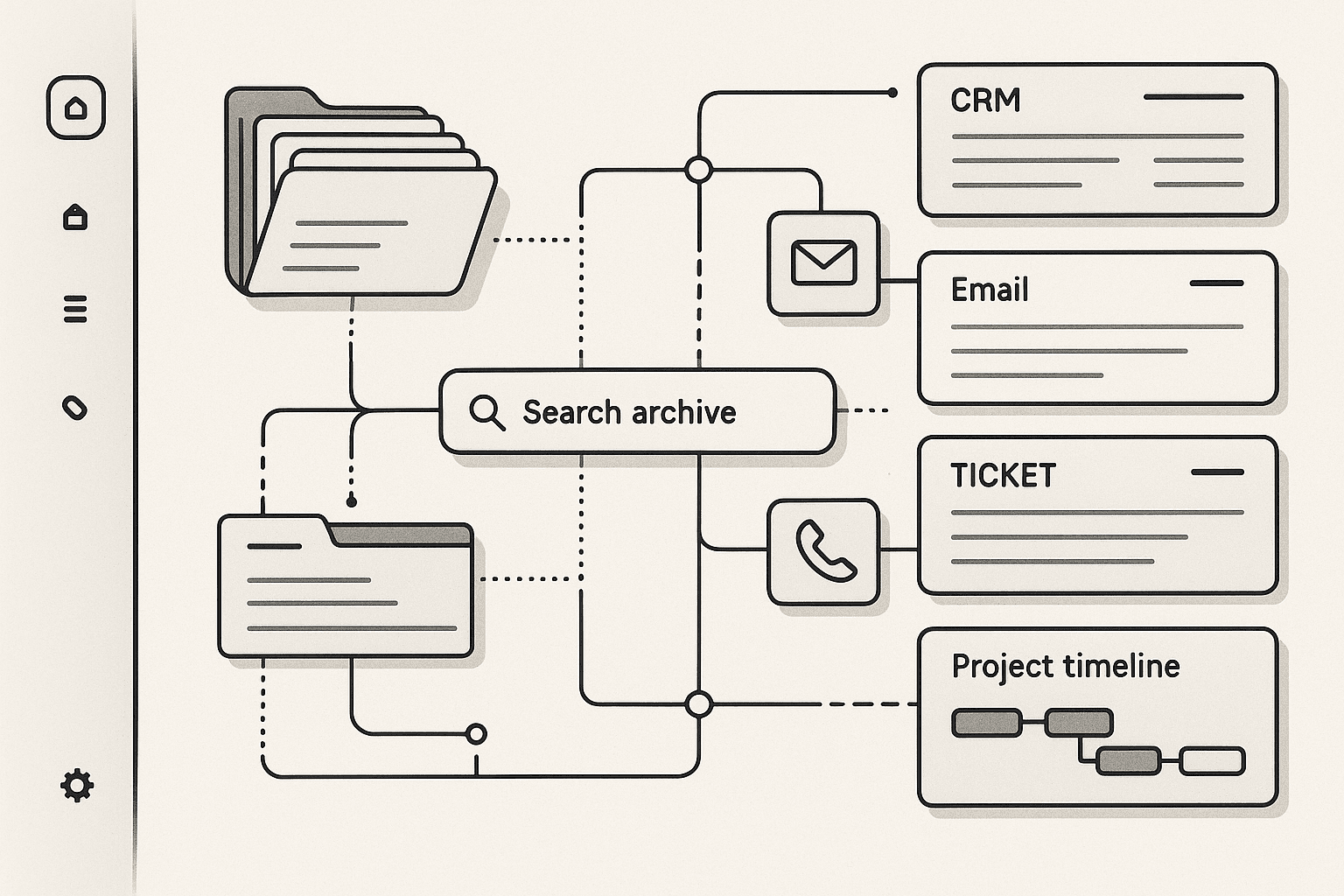
A founder usually notices the archive retrieval gap too late.
It shows up in a moment that feels small and embarrassing, but is actually operationally expensive.
A big prospect asks, “Didn’t we evaluate this vendor two years ago?” Nobody knows where that analysis lives. A product manager wants to understand why a feature was explicitly rejected last summer, but the original Jira epic is closed, the Figma file is buried, the Slack thread is gone from retention, and the PM who drove the work left six months ago. Customer success is trying to save an at-risk account and needs context on implementation promises made during the sales cycle, but the AE’s call notes are trapped in a CRM object nobody checks after closed-won. Engineering is debugging a recurring incident and suspects it resembles a painful outage from 18 months ago, except the postmortem is technically “stored” somewhere in Notion, while the decisive conversation happened in Zoom, the remediation tasks lived in Linear, and the final architectural compromise was approved in email.
The company has the information. It just can’t retrieve it with confidence.
That is the archive retrieval gap: the space between “we kept the record” and “we can reliably use it in operations.” Startups assume knowledge is preserved because systems retain data. In practice, once deals close, projects ship, employees leave, tickets resolve, or experiments end, records fall out of the active workflow and become operationally unqueryable. They still exist, but they are disconnected from the questions future teams actually ask.
This is not a compliance problem first. It is an execution problem.
When institutional memory becomes unqueryable, startups repeat failed experiments, misprice custom work, relearn customer objections, reopen already-settled architectural debates, miss legal or contractual commitments, and overestimate how much “the team knows.” That costs real money: slower deals, worse product decisions, duplicated labor, onboarding drag, and preventable incidents.
Most startups don’t design for retrieval. They design for capture, collaboration, and current-state execution. CRMs are built to move pipeline, ticketing tools to close work, docs to support active collaboration, Slack to accelerate decisions in the moment. Once the work leaves the foreground, every tool quietly starts acting like a graveyard.
A realistic failure scenario
Imagine a 70-person B2B SaaS company selling into mid-market IT teams.
Over three years, it has accumulated:
- 14,000 CRM records
- 1.2 million emails across Google Workspace
- 9,000 support tickets in Zendesk
- 3,500 Linear issues
- 2,100 Notion pages
- 700 call recordings and transcripts in Gong
- a few hundred incident and postmortem artifacts across docs, tickets, and chat
The company feels reasonably organized. It has systems. It has process. It has “documentation.”
Then three things happen in one quarter.
First, sales re-engages a prospect that went dark 16 months earlier. The old opportunity record says “Closed Lost – No Decision.” That label is technically true and practically useless. The original champion has moved to a new company and is considering the product again. The new AE wants to know:
- What technical objections came up?
- Did legal redline the MSA?
- Was pricing the issue or implementation scope?
- Which competitor was favored?
- Did the prospect require an integration the product team explicitly declined?
Some answers are in Gong. Some are in a dead Slack channel. Some live in scattered custom CRM fields that were only half-populated. The decisive legal concern is in email. The implementation concern was summarized in a solutions engineer’s personal note format that nobody else uses. The company cannot form a trustworthy account-level memory without manually hunting across six systems.
Second, product proposes a feature for enterprise reporting. It sounds new. It isn’t. Two PMs ago, the company ran a design sprint, customer discovery set, and rough technical feasibility review on the same concept. The initiative was paused because the TAM inside the current customer base didn’t justify the infrastructure lift. But now the old documents are poorly named, the decision memo is unattached to the Jira epic, and the customer interviews were transcribed but not tagged. The team repeats three weeks of work before discovering that the old conclusion was directionally right, but one enabling infrastructure assumption has changed.
Third, a former customer threatens a contract dispute over a promised feature. Customer success remembers hearing that sales “positioned it carefully.” The AE is gone. The call recording exists, but nobody knows which one matters. The implementation manager used one naming convention in Asana, support used another in Zendesk, and the signed SOW is in a shared drive folder disconnected from the CRM account record. Legal spends hours reconstructing what was represented, by whom, and when.
None of these failures happen because the company lacked software. They happen because it lacked retrievability design.
The pattern underneath the mess
Across startups, the archive retrieval gap usually follows the same pattern.
1. Systems optimize for progression, not historical reuse
Operational systems reward moving things forward:
- CRM stages advance
- tickets close
- projects complete
- incidents resolve
- employees offboard
- channels archive
After a state transition, discoverability drops. The record still exists, but the system no longer puts it in front of users. Search quality also degrades because the future query rarely matches the original storage structure.
People do not search for “Q3 enterprise reporting initiative final v2.” They search for “Why did we decide not to build customer reporting for enterprise last year?”
That semantic gap is where memory dies.
2. Context is fragmented across tools
The important decision trail almost never lives in one place.
A real decision may include:
- CRM opportunity notes
- sales call recordings
- pricing approval in Slack
- security review in a ticket
- architecture concerns in an engineering doc
- contract language in email
- customer commitments in onboarding notes
If no cross-system retrieval model exists, future teams are forced into digital archaeology.
3. Metadata is inconsistent or absent
Archives fail less because of storage and more because of missing labels.
Common examples:
- closed-lost reasons are too broad to be useful
- project names change midstream
- documents don’t reference account IDs, opportunity IDs, ticket IDs, or decision IDs
- call transcripts are not tagged by topic, account, participants, or outcome
- incident reviews are not linked to code changes or follow-up tasks
- employee offboarding does not include structured knowledge transfer tags
Without consistent metadata, search depends on remembering exact phrasing, filenames, or where a person happened to put something.
4. Retention policies are designed without retrieval use cases
A lot of startups unintentionally destroy institutional memory in the name of tool hygiene or cost control.
Examples:
- Slack retention deletes the actual decision conversation
- call transcripts are downgraded or removed after a plan change
- closed opportunities lose enrichment or attachments during CRM cleanup
- offboarded user accounts break document ownership and discoverability
- old project spaces get permissioned into oblivion
Retention should not mean “keep everything forever everywhere.” But lifecycle rules without retrieval design create silent amnesia.
5. AI is layered on top of chaos and called a solution
Many teams assume an AI search layer will solve retrieval. Sometimes it helps. Often it creates a more convincing form of failure.
If source systems are fragmented, metadata is weak, permissions are messy, and canonical records do not exist, AI can produce plausible but incomplete answers. It may retrieve the summary without the exception, the postmortem without the compensating contract note, or the roadmap rationale without the financial constraint that drove the decision.
The result is not just missing context. It is false confidence.
Why standard advice fails
The usual advice sounds reasonable:
- “Document decisions.”
- “Use a wiki.”
- “Standardize naming.”
- “Have better search.”
- “Create a knowledge base.”
None of this is wrong. It is just insufficient.
“Document more” creates content sprawl
The problem is rarely that startups wrote too little. The problem is that they created too many disconnected artifacts with no retrieval architecture.
More notes, more docs, and more transcripts can actually worsen recall if they are not tied to operational entities and lifecycle states.
“Put it in Notion” ignores source-of-truth drift
A wiki is useful for summaries and current guidance. It is not a complete archive strategy.
Why? Because the authoritative detail often remains elsewhere:
- the exact sales commitment is in the call transcript
- the exact legal term is in the redline email chain
- the exact technical tradeoff is in the design doc comments
- the exact incident sequence is in the ticket timeline and logs
If the wiki becomes a paraphrase layer with stale links, teams stop trusting it.
“Rely on CRM history” overestimates CRM discipline
Most CRM data is messy after the active selling motion ends. Required fields capture pipeline management basics, not future historical analysis. A field like “Loss Reason = Budget” is not enough to explain procurement timing, stakeholder turnover, technical blockers, pricing sensitivity, and competitor comparison.
“Enterprise search” without archive standards disappoints
Search tools can index content. They cannot manufacture structure that never existed.
If two artifacts about the same decision have no shared identifiers, if account aliases were inconsistent, if project codenames changed, or if no one marked a final decision state, search returns fragments. Good fragments, maybe. Still fragments.
“AI answers” fail where provenance matters
In startup operations, provenance matters constantly.
You don’t just need an answer. You need to know:
- Which source supports it?
- Is it the final decision or an early draft?
- Who said it?
- Was it internal debate or customer-facing commitment?
- Was there an exception later?
- Is the source still valid after org or product changes?
A clean-looking AI response without evidence trails is dangerous in sales, legal, product, support, and security contexts.
The better approach: design for retrievability, not just storage
The fix is to treat archives as an operational system.
Not a passive bucket. Not just compliance retention. An actual system with:
- defined retrieval use cases
- canonical entities and metadata
- lifecycle rules
- decision-trail standards
- explicit handoffs from active work to archive state
- AI-safe retrieval patterns with provenance
The key mental shift is simple: every closed item is a future reference object.
A closed-lost deal is not dead data. It is future market intelligence. A completed project is not finished knowledge. It is future execution guidance. A resolved incident is not over. It is future risk reduction. An offboarded employee’s work is not legacy clutter. It is future operating context.
Start with retrieval use cases, not tools
Before changing systems, define the queries you need the archive to answer.
For most startups, the high-value retrieval use cases are:
-
Re-engaging old prospects or customers
What happened last time? Why did they buy, churn, pause, or reject? -
Reusing prior product and GTM decisions
Why did we choose or reject this idea before? -
Resolving contractual, support, or implementation disputes
What was promised, documented, approved, and delivered? -
Debugging recurring incidents or operational failures
Have we seen this before, and what did we learn? -
Onboarding new leaders and replacing departed context owners
What should this person know that isn’t obvious from the current-state docs? -
Preparing for diligence, audits, and strategic reviews
Can we reconstruct decision history, customer history, and control history quickly?
If your archive cannot answer these six categories reliably, it is not operationally sound.
The archive operating model
Here is the practical model I recommend for startups from 20 to 500 people.
Layer 1: Systems of record stay where they are
Do not try to migrate every artifact into one giant repository. That usually becomes expensive, brittle, and politically painful.
Keep source systems in place:
- CRM for accounts, opportunities, contacts
- ticketing for support and incidents
- docs/wiki for memos and summaries
- call platform for recordings and transcripts
- email for contractual and executive threads
- project management for implementation and product work
The goal is not one storage location. The goal is one retrieval framework.
Layer 2: Define canonical entities
Most retrieval failures happen because archives are organized by tool location instead of business entities.
Define a minimal canonical entity set that everything can map to:
- Account
- Opportunity / Deal
- Project / Initiative
- Customer Issue / Incident
- Decision
- Contract / Commitment
- Person
Every important archived artifact should connect to at least one canonical entity, and usually two or three.
Examples:
- A sales call transcript → Account, Opportunity, Decision
- A postmortem → Incident, Project, Decision
- A design memo → Project, Decision
- An onboarding note → Account, Contract, Commitment
- A legal redline chain → Account, Contract, Opportunity
Layer 3: Create archive metadata standards
This is the highest-leverage operational work you can do.
At minimum, every archival object worth future reuse should have:
- entity type(s)
- primary entity ID
- related entity IDs
- date range
- owner at time of creation
- lifecycle status
- summary
- key outcome
- confidence / canonical status
- permissions classification
- retention class
Then add domain-specific metadata.
For deals
- stage outcome: closed-won / closed-lost / no decision / churn / expansion
- loss/win reason taxonomy
- competitor(s)
- pricing posture
- decision makers
- blockers
- promised capabilities
- required integrations
- renewal/churn risk factors
For projects
- project type: product / GTM / ops / finance / hiring / legal
- hypothesis or objective
- final decision state
- success/failure reason
- dependencies
- artifacts index
- follow-on work
For incidents
- severity
- root cause class
- contributing factors
- affected systems
- customer impact
- remediation status
- repeat pattern tags
For decisions
- decision ID
- problem statement
- options considered
- final decision
- approver
- rationale
- reversal conditions
- superseded by
That last one matters. Most startups record decisions poorly because they capture outputs without reversal logic. Future teams need to know not only what was decided, but under what conditions that decision should be revisited.
Layer 4: Maintain a searchable decision trail
This is where most archive programs become actually useful.
Create a standard “decision record” format that acts as the spine between artifacts.
A decision record should include:
- Decision ID
- Date
- Status: proposed / approved / rejected / superseded
- Context
- Alternatives considered
- Final rationale
- Links to source artifacts
- Linked entities
- Downstream commitments or tasks
- Review trigger
This does not need to be heavy. One page or template is enough.
But it needs to be mandatory for meaningful decisions in:
- enterprise deal exceptions
- product roadmap reversals
- custom implementation promises
- security/compliance exceptions
- architecture tradeoffs
- major hiring or org design changes
- incident remediations with durable consequences
The decision record is not there to replace source material. It is there to make that material retrievable later.
Layer 5: Add lifecycle rules for archival transitions
The moment work transitions from active to inactive is where context gets lost.
So define explicit archive handoff rules.
Closed-won deal handoff
Before an opportunity is marked closed-won, capture:
- final decision summary
- promised capabilities and caveats
- commercial exceptions
- implementation risks
- key stakeholder map
- linked call(s), proposal(s), and contract(s)
Send this into both customer success workflow and the archive index.
Closed-lost deal handoff
Before or immediately after close, capture:
- actual reason narrative, not just field taxonomy
- competitor context
- unresolved objections
- economic timing
- integration/security blockers
- re-engagement trigger
- linked transcript(s), legal artifacts, pricing notes
That one extra structured summary is often worth tens of thousands in recovered pipeline later.
Project closure handoff
At completion, cancellation, or pause, record:
- what was attempted
- what changed
- what was learned
- what remains true
- what should be reused next time
- links to artifacts and decision records
Employee offboarding handoff
Require departing employees in context-heavy roles to tag:
- accounts/projects/incidents they uniquely influenced
- unresolved assumptions
- hidden stakeholder history
- where sensitive or exceptional context lives
Without this, you are not offboarding. You are context-deleting.
Implementation details: a startup-grade playbook
Here is how I would implement this in a real startup without turning it into a six-month knowledge management program.
Phase 1: Pick the highest-value archive domain
Do not start enterprise-wide. Start where retrieval failures hurt most.
Usually that is one of three places:
- closed-won / closed-lost sales memory
- product/project decision history
- incident/support resolution history
Pick one.
For many B2B startups, I’d start with deal memory because the ROI is obvious and cross-functional pain is immediate.
Phase 2: Define a minimal metadata schema
Keep version one small enough that humans will comply.
For a deal archive, required fields might be:
- account ID
- opportunity ID
- outcome type
- summary narrative
- top 3 blockers/drivers
- competitors
- promised features/integrations
- key contacts
- source links
- re-engagement trigger
- confidence level
This can live as CRM fields plus a linked standardized memo/template.
Phase 3: Create an archive summary object
Do not rely on raw source artifacts alone.
For each closed item, create one summary object that acts as the retrieval landing page.
Examples:
- “Opportunity Archive Summary”
- “Project Closure Record”
- “Incident Knowledge Record”
That object should answer the future operator’s first questions in under two minutes and then link outward to the evidence.
Think of it as the table of contents for a historical event.
Phase 4: Attach source links with stable identifiers
Every archive summary should point to the exact artifacts that matter.
Not “see Gong.”
Instead:
- Gong call 2024-02-13 discovery with security lead
- redline thread message link
- pricing exception approval thread
- final implementation scoping doc
- postmortem document
- final architecture review
Broken or vague links destroy trust.
Phase 5: Set quality gates at closure moments
This is critical. If you ask people to backfill archives later, they won’t.
Archive capture needs to happen at the state transition:
- when the opportunity closes
- when the project is canceled or shipped
- when the incident is resolved
- when the employee exits
Make archive completion part of definition-of-done.
Phase 6: Enable search by questions, not just filenames
Even without fancy AI, you can improve retrieval dramatically by indexing summaries and metadata around real operator questions.
Examples:
- “Show me all closed-lost healthcare deals where security review stalled procurement.”
- “Find product decisions rejecting SSO-related custom work for sub-50k ARR prospects.”
- “Show incidents involving webhook queue saturation with customer impact over 20 accounts.”
- “Find churned customers who cited missing reporting and had low implementation adoption.”
That requires:
- standardized taxonomies
- linked entities
- summary narratives
- consistent IDs
Not magic.
Tool comparisons: what each category is good and bad at
No single tool solves this. You need to understand the tradeoffs.
CRM systems: Salesforce, HubSpot
Good at:
- account and opportunity structure
- required fields and workflows
- reporting on standard metadata
- entity linking
Bad at:
- nuanced narrative retrieval
- cross-functional context outside sales
- long-form decision history
- storing evidence trails elegantly
Best use: canonical IDs, stage transitions, archive summary entry point for deals.
Wikis/docs: Notion, Confluence, Coda, Google Docs
Good at:
- summaries
- decision memos
- templates
- human-readable closure records
Bad at:
- enforcing structured metadata at scale
- preventing sprawl
- preserving source-of-truth discipline
- granular archival search across operational systems
Best use: archive summaries and decision records, not sole system of memory.
Ticketing/project tools: Jira, Linear, Asana
Good at:
- work history
- status transitions
- issue relationships
- engineering/ops traceability
Bad at:
- executive or customer-facing narrative
- cross-domain retrieval
- durable summaries after work closes
Best use: source evidence and linked tasks for incidents/projects.
Call intelligence: Gong, Chorus
Good at:
- transcripts
- interaction history
- surfacing exact wording
- customer voice evidence
Bad at:
- becoming the canonical archive on its own
- structured cross-functional retrieval
- preserving conclusions unless tagged and summarized
Best use: source evidence for customer and deal memory.
Internal search/knowledge tools: Glean, Guru, Slab-style layers
Good at:
- broad indexing
- unified search experiences
- natural language retrieval
- reducing hunt time
Bad at:
- fixing missing metadata
- resolving contradictory sources automatically
- guaranteeing provenance or finality
Best use: retrieval interface layered on top of disciplined archive standards.
Data warehouse / lakehouse layer
Good at:
- central analytics
- entity resolution
- historical reporting
- joining records across systems
Bad at:
- serving as a day-to-day human archive UI
- capturing narrative nuance without an app layer
Best use: back-end model for entity joins, trend analysis, and compliance-grade retention references.
AI-safe retrieval patterns
AI can help a lot here, but only if you constrain it.
Pattern 1: Retrieval should return answer + evidence + status
Never let an AI archive assistant answer with pure synthesis.
For each answer, require:
- concise summary
- source list with links
- source dates
- canonical vs non-canonical marker
- confidence score
- note on possible missing systems
Example:
Prior closed-lost reason appears to be security review delay plus missing SCIM support, based on Gong call on 2025-01-12, security questionnaire thread, and CRM archive summary. Canonical status: medium, because Slack approval thread was not retained.
That is operationally useful and honest.
Pattern 2: Separate summary objects from raw evidence
AI performs better when there is a canonical summary layer to anchor retrieval.
Use AI to:
- draft archive summaries at closure time
- suggest metadata tags
- highlight likely commitments or blockers
- cluster related historical cases
But require humans to approve anything that becomes canonical.
Pattern 3: Enforce permissions at retrieval time
Historical context often contains compensation data, legal language, HR matters, security details, or privileged communications.
Your archive assistant must inherit source permissions or stricter derived permissions.
A common mistake is creating a “smart knowledge bot” that summarizes restricted content into a broader audience channel.
That is not a retrieval win. That is a governance failure.
Pattern 4: Distinguish final decisions from discussion noise
If AI indexes every discussion equally, it may over-weight drafts and debate.
So structure retrieval around hierarchy:
- decision records and closure summaries
- approved final docs/contracts
- supporting evidence
- discussion artifacts
This greatly reduces answer drift.
Pattern 5: Show ambiguity instead of hallucinating certainty
If records conflict, the system should say so.
Example:
Two sources disagree on whether custom SAML mapping was committed. The CRM summary says “not committed”; a sales call transcript suggests “likely feasible in onboarding.” Please review contract exhibit A and implementation kickoff notes.
That kind of answer prevents expensive mistakes.
Workflow examples
Workflow 1: Closed-lost deal archive
Current bad workflow: Opportunity closes → AE selects generic loss reason → notes remain scattered → six months later nobody can reconstruct the account.
Better workflow:
- Opportunity enters closing stage.
- CRM requires archive summary completion.
- AI drafts summary from call transcripts, notes, and email metadata.
- AE or sales ops approves/edit:
- true loss reason narrative
- blockers
- competitor
- stakeholder map
- re-engagement trigger
- promised/required capabilities
- Summary links to exact transcripts, pricing approvals, security artifacts.
- Record is indexed by account, segment, use case, competitor, blocker taxonomy.
- Re-engagement play pulls archive summary automatically.
Time cost: 8–15 minutes per strategic deal, 3–5 minutes for smaller deals.
ROI: one saved re-engagement or one avoided repeat sales cycle usually pays for the quarter.
Workflow 2: Project closure memory
Current bad workflow: Project ends → final tasks close → maybe someone writes a retro → doc is never linked to future planning.
Better workflow:
- Project status changes to shipped/paused/canceled.
- PM completes closure record with:
- objective
- result
- decisions made
- assumptions validated/invalidated
- what should be reused
- Closure record links to roadmap ticket, design docs, research, launch metrics.
- Important decisions are extracted into decision records.
- Future project intake requires a “historical related work” check.
Time cost: 20–30 minutes per meaningful initiative.
ROI: avoiding even one repeated exploration sprint saves multiple team-weeks.
Workflow 3: Incident retrieval memory
Current bad workflow: Incident resolved → postmortem written for engineering → support/customer impact details stay elsewhere → later incident search misses pattern.
Better workflow:
- Incident resolved.
- Incident knowledge record generated with:
- symptoms
- root cause class
- customer impact
- tactical fix
- structural fix
- repeat-detection tags
- Links to postmortem, support ticket cluster, code fix, status page updates.
- Future incident commander search includes historical pattern tags.
Time cost: 15–25 minutes beyond standard postmortem hygiene.
ROI: faster MTTR and lower repeat failure cost.
Cost and time analysis
Founders often worry this sounds bureaucratic. It can be, if overbuilt. Done correctly, it is very economical.
Lightweight startup implementation
For a 50–100 person startup:
- 1 operations owner or chief of staff type: 0.2–0.4 FTE for design and rollout over 6–8 weeks
- department leads for input: 2–4 hours each
- admin/system work: 10–25 hours depending on tools
- template creation: 1–2 days
- taxonomy cleanup: 1–2 weeks of iterative tuning
- user training: 2–3 short sessions
Ongoing operating cost
- archive capture on closure moments: usually 5–30 minutes per meaningful event
- periodic taxonomy maintenance: 2–4 hours/month
- quarterly retrieval audit: half day
What it prevents
Even conservative numbers justify the effort.
If the archive retrieval gap causes any of the following, you are already paying more than the fix costs:
- 2 enterprise deals/year slowed or lost due to forgotten context
- 1 product team-month/year wasted repeating prior research
- 1 contract dispute escalated because promise history is unclear
- 2 repeat incidents/year with avoidable remediation delay
- 3–5 weeks/year of executive or ops archaeology across functions
For many startups, this is a low five-figure annual problem at minimum and often a six-figure one when you include revenue drag.
Common mistakes when implementing the fix
Mistake 1: Trying to archive everything equally
Don’t.
Not all history deserves the same structure. Prioritize high-consequence objects:
- strategic deals
- pricing exceptions
- product reversals
- incidents with customer impact
- special contractual commitments
- executive decisions with downstream constraints
Mistake 2: Making the template too heavy
If archive closure feels like filing taxes, people will bypass it.
You want the minimum structure that makes future retrieval reliable.
Mistake 3: Separating summaries from operations entirely
If the archive is “something ops does later,” it will rot.
The archive step must sit inside the operational workflow at closure.
Mistake 4: Ignoring identity and alias problems
Accounts rename. Prospects merge. projects get codenames. people switch emails.
If you don’t normalize identifiers, retrieval degrades fast.
Mistake 5: No audit of actual retrieval success
The test is not “did we store the record?”
The test is “can a new person answer a high-value historical question in under five minutes with trustworthy evidence?”
Run that test quarterly.
A practical minimum viable standard
If you want the shortest path to improvement, implement this first:
- Pick one archive domain: deals, projects, or incidents.
- Create one closure summary template.
- Require 5–10 metadata fields.
- Link exact source artifacts.
- Assign canonical entity IDs.
- Add one decision record template.
- Enforce completion at close.
- Audit retrieval on 10 real historical questions.
That alone will put you ahead of most startups.
Takeaways
The archive retrieval gap is what happens when startups confuse retained data with usable memory.
Your company’s most valuable context often becomes hardest to access right after it stops being active:
- deals close
- projects finish
- incidents resolve
- employees leave
- conversations age out
At that point, the information still exists but becomes operationally unqueryable. That is why teams repeat mistakes, forget customer history, lose decision rationale, and rebuild context from scratch.
The answer is not more documentation by itself. It is retrievability design.
That means:
- organizing history around canonical business entities
- enforcing lightweight metadata standards
- creating searchable closure summaries
- maintaining decision trails with provenance
- designing lifecycle rules for archive handoff
- using AI as a retrieval aid, not a truth generator
Founder to founder: this is one of those boring systems problems that quietly shapes company quality.
When your archive works, teams move faster, argue less, repeat fewer mistakes, onboard better, re-engage smarter, and handle disputes with confidence. When it doesn’t, every historical question turns into a scavenger hunt led by whoever has been around longest.
That is not scale. That is dependency disguised as experience.
If you are building a company meant to outlast its current team configuration, then closed work cannot be treated like dead work. It needs to remain queryable, attributable, and connected to future execution.
Otherwise your startup keeps paying to learn what it already learned.