
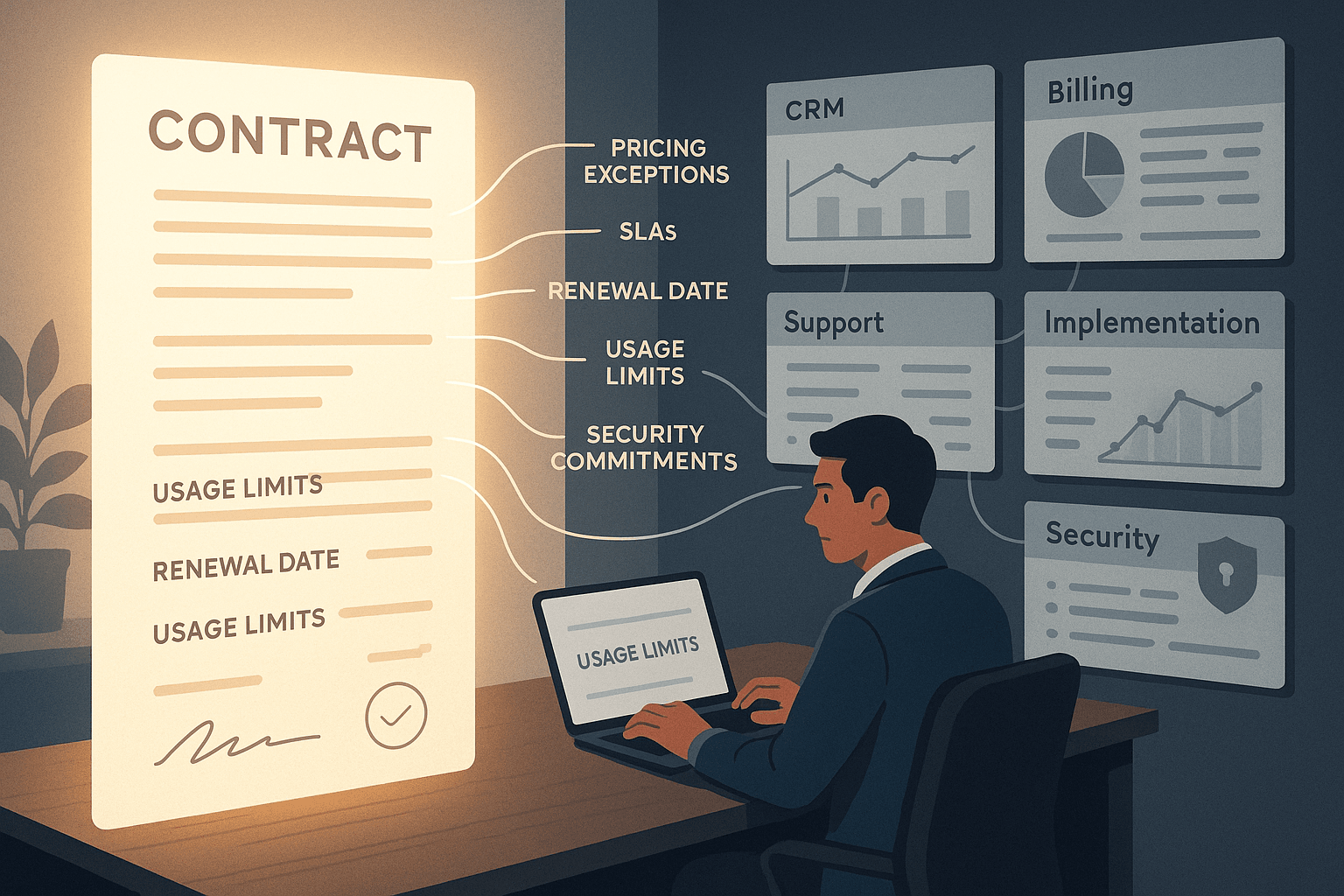
A few months after closing a “transformational” enterprise deal, the problems start showing up in places that don’t look connected.
Support is getting escalations because the customer believes they bought a 30-minute response SLA for P1 issues, while the support team is handling them on the standard four-hour plan. Finance notices the invoice is higher than expected because the contract included a non-standard overage cap that never made it into billing. The CSM is surprised by a churn threat tied to a promised QBR cadence that nobody operationalized. Product and engineering get dragged into an emergency because the customer is invoking a security commitment from the redline that the implementation team never saw. Then, six weeks before renewal, legal discovers an auto-renew opt-out window that no one tracked.
None of these failures happened because the company lacked a signed agreement. They happened because the agreement never became operational reality.
That is the contract memory gap: the distance between what was negotiated and signed, and what the rest of the company actually knows, remembers, and executes.
For startups, this gap is especially dangerous because the company is still running on human memory, Slack threads, heroics, and goodwill. The first few custom deals feel manageable. Everyone still remembers the “special stuff” for the big logo customer. Then the company signs 20 more deals, changes account managers, replaces a finance lead, migrates support tools, and suddenly critical commercial and operational terms are trapped inside PDFs, email chains, and redlines. Revenue leaks out. Risk piles up quietly. Customers lose trust. Internal teams start blaming each other.
The fix is not “buy a CLM” in the abstract. The fix is to treat signed contracts as structured operational inputs, not just legal artifacts.
This article is a tactical playbook for doing that.
The failure scenario: how the memory gap shows up in real startups
Let’s start with a realistic example.
A Series A B2B SaaS startup closes a $180,000 annual contract with a mid-market customer. To get the deal done at quarter end, sales and legal agree to a set of custom terms:
- 15% discount for year one, with a 5% renewal cap
- Net 60 payment terms instead of Net 30
- A custom implementation timeline with a dedicated solutions engineer for the first 45 days
- A monthly service review call
- A P1 response SLA of 1 hour
- A security questionnaire remediation commitment for two low-risk items within 90 days
- A usage cap with overages only billable after written approval
- A customer opt-out notice window 45 days before auto-renewal
The agreement gets signed in DocuSign and saved to a folder. A celebration emoji goes out in Slack. The AE updates the opportunity stage to Closed Won and moves on.
What happens next?
Week 1: implementation starts with missing context
The implementation manager gets a handoff note that says “strategic account, needs white-glove onboarding.” But they do not see the dedicated solutions engineer commitment or the 45-day timeline. They schedule the project using the standard onboarding plan.
The customer notices immediately.
From the customer’s point of view, your company has already failed to deliver on a written promise before kickoff is even complete.
Week 3: billing drifts from the commercial deal
Finance generates the first invoice using the default billing setup: Net 30, standard usage overage logic, and annual prepay language from the quote.
The customer disputes the invoice. Collections timing slips. The finance lead now has to manually reconcile what the contract says versus what the billing system was configured to do.
That is not just annoying. It affects cash flow forecasting and revenue operations confidence.
Month 2: support delivers the wrong service level
A production issue hits. The support platform does not flag the account as having a 1-hour P1 SLA because nobody entered that term into the support system. The team responds according to the default queue. The customer escalates to the CRO and references the signed MSA.
Now the issue is not only operational. It is relational and legal.
Month 4: security obligations resurface unexpectedly
The customer’s security team asks for an update on the two remediation items your company committed to within 90 days. The commitment lived in a security exhibit that was never captured outside the final PDF.
Engineering leadership hears about it for the first time from an angry email forward.
Month 10: renewal management fails silently
The account is healthy, but nobody tracks the 45-day opt-out notice window or the 5% renewal increase cap. Sales assumes they can push through a larger uplift. The customer objects, says your team is ignoring the contract, and starts evaluating alternatives.
The contract did not fail. Your company’s memory failed.
The pattern: why this keeps happening
Once you look for it, the pattern is everywhere.
Startups usually have decent systems for pre-signature work:
- CRM for pipeline and forecast
- CPQ or quoting tools for pricing
- Contract redlining in Word, Google Docs, Ironclad, Juro, Concord, PandaDoc, or similar tools
- E-signature through DocuSign or Dropbox Sign
Then after signature, there is a cliff.
Critical terms need to flow into:
- CRM/account records
- Billing/subscription systems
- ERP or finance workflows
- Support platforms
- CSM playbooks
- Implementation and project delivery tools
- Security and compliance tracking
- Renewal calendars and task systems
But in most startups, they do not.
Instead, the company relies on a weak chain of assumptions:
- Sales remembers the special terms.
- The AE communicates them in a handoff doc.
- The onboarding team reads the handoff doc carefully.
- Finance catches non-standard billing logic.
- Support is told about custom SLAs.
- CS remembers renewal constraints months later.
- Legal gets pulled in only if something goes wrong.
That is not a process. That is optimism.
The deeper reason this happens is that contracts span functions, while startups are still organized around function-specific tools.
Legal owns the document. Sales owns the relationship. RevOps owns CRM hygiene. Finance owns invoicing. Support owns response times. CS owns renewals. Implementation owns delivery. Security owns commitments.
But no one owns the translation layer between “signed text” and “operational execution.”
That translation layer is where money and risk live.
Why standard advice fails
Most advice on contracts in startups falls into one of four buckets, and none of them solves the actual problem alone.
1. “Standardize contracts and avoid custom terms”
In theory, yes. In practice, if you sell to mid-market or enterprise customers, custom terms happen.
Maybe it is a pricing exception to win a competitive bake-off. Maybe procurement insists on Net 60. Maybe security needs a remediation plan. Maybe the customer negotiated a specific implementation commitment because your product is mission-critical.
You can reduce customization, but you cannot assume it goes away.
If your operational model only works when every contract is standard, it does not work.
2. “Put everything in the CRM”
This sounds sensible until you ask: who puts it there, in what format, with what validation, and how does it get updated when the final redline changes something after the quote was approved?
Many startups end up with a CRM full of free-text notes like:
- “custom sla maybe 1 hr?”
- “ask legal re renewal cap”
- “customer wanted usage cap thing”
That is not reliable operational data. That is a graveyard of ambiguous memory fragments.
The issue is not whether terms exist somewhere in CRM. The issue is whether they exist as structured fields, owned by a process, connected to downstream actions.
3. “Have a better handoff meeting”
Handoffs help, but meetings are not durable systems.
A great handoff can make the first 30 days better. It does not help six months later when finance changes personnel, the CSM leaves, or renewal strategy depends on a pricing cap buried in an order form.
If your process depends on people remembering what was said in a handoff call, you still have a memory problem.
4. “Buy a CLM platform”
A contract lifecycle management tool can absolutely help, but startups often buy one too early or implement it too narrowly.
A CLM can centralize documents, workflows, approvals, metadata, and obligations. But if your downstream systems are not mapped, your field definitions are vague, or no one owns post-signature operations, you just moved the PDF into a nicer container.
The problem is not contract storage. The problem is operational propagation.
A CLM is useful if it becomes the source of structured truth and triggers action across systems. It is not useful if it becomes an expensive archive.
The better approach: build a contract-to-operations pipeline
The practical fix is to create a contract-to-operations pipeline.
Think of it like this: when a contract is signed, your company should produce not just a PDF, but a package of structured operational data that updates systems, creates tasks, and assigns accountability.
At a minimum, every signed deal should result in three outputs:
- Structured term capture: the non-standard terms are extracted into a standard schema.
- System updates: the right fields and records are updated in CRM, billing, support, project delivery, and renewal tracking.
- Triggered workflows: tasks, alerts, approvals, and recurring obligations are assigned to owners.
This does not have to start as an enterprise-grade automation project. In fact, for most startups, it should not.
The right model is maturity-based.
Maturity model: how to fix this without overbuilding
Stage 1: Manual but structured
Best for: seed to early Series A, low contract volume, meaningful custom deal terms.
At this stage, the goal is not full automation. The goal is to eliminate unstructured memory.
You create:
- A standard contract term intake form
- A required post-signature review step
- A contract metadata table with defined fields
- Clear owners for each operational domain
- A simple obligation tracker
A human still reads the signed agreement and enters key terms. That is fine. What matters is consistency.
Typical stack:
- CRM: HubSpot or Salesforce
- Contract storage: Google Drive, Notion, Dropbox, or simple repository
- Intake/metadata: Airtable, Notion database, Google Sheet, or CLM metadata fields
- Tasking: Asana, ClickUp, Monday, Jira, or Linear
- Billing: Stripe Billing, Chargebee, Recurly, or manual finance workflow
- Support: Zendesk, Intercom, Freshdesk
Cost/time:
- Setup time: 1–2 weeks
- Ongoing effort: 15–45 minutes per signed contract
- Software cost: minimal incremental cost if using existing tools
This stage works surprisingly well if you define the right fields and accountability.
Stage 2: Semi-automated routing
Best for: Series A/B startups with growing enterprise motion and increasing cross-functional complexity.
At this stage, you still may not fully parse every contract automatically, but you reduce manual re-entry and improve workflow triggers.
You add:
- Standard field mapping from quote/approval stage into contract metadata
- E-signature completion trigger
- Workflow automation using Zapier, Make, Workato, or native integrations
- Predefined rules for routing obligations by term type
- SLA and billing exceptions synced into downstream systems
For example:
- Signed DocuSign envelope triggers creation of a “contract ops review” task
- Contract metadata record is generated automatically
- Renewal notice date is calculated and pushed to CRM
- Support plan field is updated in Zendesk
- Billing exception workflow is created for finance approval
- Security commitments create Jira tickets or GRC tasks
Typical stack:
- CLM or contract repository with metadata
- CRM + workflow automation
- E-signature integrations
- Airtable/operations database
- Zapier/Make/Workato for orchestration
Cost/time:
- Setup time: 3–6 weeks
- Ongoing effort: 10–20 minutes per contract review plus exception handling
- Software cost: low to moderate, depending on automation tools and CLM
This is the sweet spot for many startups.
Stage 3: Structured source-of-truth with extraction and downstream sync
Best for: later-stage startups with material enterprise volume, compliance requirements, or heavy contracting complexity.
At this stage, contract data becomes a first-class operational object.
You implement:
- Contract schema with required metadata fields
- Clause library tied to operational categories
- Automated or AI-assisted term extraction with human review
- Bi-directional sync between CLM, CRM, support, billing, and project systems
- Obligation calendars and audit trails
- Exception reporting and compliance dashboards
Typical stack:
- Ironclad, LinkSquares, Juro, Conga, Icertis, or similar
- Salesforce as commercial source-of-truth
- ERP/billing integrations
- Ticketing/project tools with workflow rules
- Data warehouse reporting for compliance and revenue leakage
Cost/time:
- Setup time: 2–4 months
- Ongoing effort: low per contract, higher governance overhead
- Software cost: moderate to high
Many startups should not start here. But if you are signing lots of custom contracts and the cost of missing terms is high, this investment becomes rational.
What terms actually need to be operationalized
One of the biggest mistakes is trying to capture every clause with equal importance. That creates data bloat and team fatigue.
Focus on terms that change how another team must act.
Here is a practical taxonomy.
1. Commercial terms
These affect revenue collection and forecasting.
Examples:
- Pricing exceptions
- Discount duration
- Renewal caps/floors
- Payment terms
- Billing frequency
- Overage rules
- Usage caps
- Refund credits
- Price holds
Operational destinations: CRM, billing, finance, renewal planning
2. Service terms
These affect customer experience and delivery.
Examples:
- SLA commitments
- Support hours
- Named support contacts
- Escalation paths
- QBR cadence
- Dedicated resources
- Implementation milestones
- Training commitments
Operational destinations: support platform, CS playbooks, implementation/project tools
3. Legal/renewal control terms
These affect future negotiation posture and risk.
Examples:
- Auto-renewal notice windows
- Termination rights
- Benchmarking rights
- Most-favored pricing clauses
- Change-of-control terms
- Venue/governing law exceptions
- Data retention commitments after termination
Operational destinations: CRM, legal reminders, renewal workflows, offboarding process
4. Security and compliance commitments
These often get lost because they live in exhibits or questionnaires, not core order forms.
Examples:
- Specific remediation deadlines
- Audit support commitments
- Incident notification timing
- Encryption/storage commitments with implementation implications
- Data residency requirements
- Subprocessor notification promises
Operational destinations: security/GRC tracker, engineering backlog, incident response process, customer-facing compliance records
5. Product and technical scope terms
These affect entitlement and delivery expectations.
Examples:
- Environment limits
- API usage restrictions
- Seat definitions
- Feature exclusions
- Sandbox commitments
- SSO or SCIM implementation scope
- Integration responsibilities
Operational destinations: provisioning, product ops, implementation, support
If a clause changes what a downstream team must do, it needs structure, ownership, and a system destination.
The core operating model: one contract schema, many system actions
Here is the simplest way to think about the operating model.
Step 1: define a contract operations schema
Create a standard field set for all signed deals. Not all fields will be used in every deal, but the schema should be consistent.
A useful starter schema includes:
Account and document basics
- Account name
- Contract ID
- Document type (MSA, order form, DPA, SOW)
- Effective date
- Start date
- End date
- Auto-renewal status
- Renewal notice date
- Contract owner
Commercial
- Contracted ARR/TCV
- Billing frequency
- Payment terms
- Discount amount/type
- Renewal price cap/floor
- Overage allowed Y/N
- Overage approval required Y/N
- Usage cap details
Service/support
- Support tier
- Custom SLA Y/N
- P1 response SLA
- Support hours/time zone
- QBR cadence
- Dedicated resource commitment Y/N
- Implementation milestone commitment Y/N
Security/compliance
- Security exhibit attached Y/N
- Remediation commitments Y/N
- Remediation due dates
- Incident notice commitment
- Data residency requirement
Operational flags
- Non-standard billing Y/N
- Non-standard renewal Y/N
- Non-standard implementation Y/N
- Non-standard support Y/N
- Exec visibility required Y/N
This schema should not live only in legal. It should be co-designed by legal, RevOps, finance, support, CS, and implementation.
Step 2: assign domain owners by term category
One common failure mode is making legal responsible for everything after signature. Legal should not own operational execution.
A better ownership model:
- Legal/Deal Desk: validates final signed terms and metadata completeness
- RevOps: owns CRM mapping, renewal fields, and commercial data integrity
- Finance/Billing Ops: owns payment terms, invoicing logic, and overage configuration
- Support Ops: owns SLA/support entitlement setup
- CS/Implementation Ops: owns onboarding and service commitment execution
- Security/GRC: owns remediation and compliance obligations
No single function can carry this end-to-end alone, but one role should own the process orchestration. Usually this sits in RevOps, Deal Desk, or BizOps.
Step 3: create required post-signature review gates
Before a deal is considered fully operationalized, someone must verify the critical terms were translated.
At minimum, have a post-signature checklist with signoff from:
- RevOps for CRM/renewal data
- Finance for billing setup
- Support Ops for SLA entitlements
- Implementation or CS for delivery commitments
- Security for any remediation obligations
This does not need to be bureaucratic. For most startups, a lightweight workflow with defined SLAs is enough.
For example:
- Within 1 business day of signature: contract metadata completed
- Within 2 business days: billing and CRM updated
- Before customer kickoff: implementation and support commitments confirmed
- Within 5 business days: security obligations routed
The point is not paperwork. The point is operational readiness.
Workflow example: a practical post-signature flow
Here is a workflow that works well for many startups.
Workflow A: manual-structured process
- Contract is signed in DocuSign.
- E-sign notification automatically creates a “Post-signature contract review” task in Asana.
- Deal Desk or RevOps opens the signed PDF and completes a contract metadata form.
- The form includes required fields and yes/no flags for non-standard terms.
- Based on those flags, tasks are assigned automatically:
- Finance task for Net 60 or special billing
- Support Ops task for custom SLA
- Implementation task for dedicated resource or milestone promises
- Security task for remediation commitments
- CS task for QBR cadence and renewal notice tracking
- RevOps updates CRM renewal fields and links the signed document and metadata record.
- Finance confirms billing configuration.
- Support Ops confirms entitlement setup.
- Implementation lead confirms kickoff plan aligns with contract.
- Workflow closes only when all required confirmations are done.
This is not fancy. It is reliable.
Workflow B: semi-automated process
- Opportunity is marked Closed Won.
- Quote data pre-populates a contract record.
- Signed envelope status triggers metadata review.
- AI extraction suggests key non-standard terms from the final document.
- Human reviewer approves or edits extracted fields.
- Approved fields sync to:
- Salesforce account and opportunity
- Billing platform customer/subscription record
- Zendesk support plan field
- Jira onboarding epic
- Security compliance tracker
- Renewal notice dates and pricing cap alerts create future tasks automatically.
- Dashboard tracks incomplete post-signature operationalization by owner and aging.
This is where many scaling startups should aim.
Tool comparisons: what to use at different stages
There is no universal best stack, only fit-for-stage.
Option 1: Spreadsheet/Airtable-centric
Best for: early-stage startups with low volume and ops discipline.
Stack example:
- DocuSign + Google Drive
- Airtable contract metadata base
- Zapier for notifications
- HubSpot/Salesforce for key account fields
- Asana for tasks
Pros:
- Cheap
- Fast to implement
- Flexible schema
- Easy for ops teams to own
Cons:
- Manual data entry risk
- Weak governance if unmanaged
- Harder to maintain as volume grows
- Limited auditability versus CLM
Rough cost: $100–$500/month incremental, depending on tools already owned
Option 2: CRM-centric with workflow automation
Best for: startups where RevOps is strong and most downstream actions already anchor in CRM.
Stack example:
- Salesforce/HubSpot as primary record
- PandaDoc/DocuSign for execution
- Custom objects/fields for contract metadata
- Zapier/Make/Workato for routing
- Zendesk/Chargebee/Jira integrations
Pros:
- Keeps commercial truth close to pipeline and renewals
- Good visibility for sales and CS
- Strong reporting if CRM is well-governed
Cons:
- CRM can become cluttered
- Legal may resist CRM as contract system of record
- Document versioning and clause intelligence are limited
Rough cost: $500–$3,000+/month incremental depending on automation and CRM maturity
Option 3: CLM-led model
Best for: startups with higher contract complexity, legal involvement, and enterprise volume.
Stack example:
- Ironclad, Juro, LinkSquares, Conga, or similar
- Salesforce integration
- Billing/support/project system sync
- Obligation and approval workflows inside CLM
Pros:
- Better metadata, governance, audit trail, and legal usability
- Stronger source-of-truth for final agreements
- Better for clause libraries and extraction
Cons:
- More implementation effort
- Higher software cost
- Can become shelfware if downstream mapping is weak
Rough cost: often $10,000–$50,000+ annually, sometimes much more
Option 4: Purpose-built contract ops layer on top of existing tools
Some companies build an internal contract operations database or workflow hub using Airtable, Retool, Notion, or an internal app.
Best for: ops-heavy startups with strong internal builders and unique process needs.
Pros:
- Tailored exactly to your workflow
- Faster than full CLM rollout
- Can bridge gaps across systems elegantly
Cons:
- You own maintenance
- Fragile if built by one operator who leaves
- Needs clear governance and documentation
For most startups, the best answer is not “replace everything.” It is “create one structured post-signature layer that reliably maps terms into existing systems.”
How to decide what to automate first
Do not automate based on what is easiest technically. Automate based on cost of failure.
A simple prioritization framework:
High-risk, high-frequency terms
Automate first.
Examples:
- Payment terms
- Billing frequency
- Renewal dates and notice windows
- Support tier/SLA
- Usage caps and overage restrictions
These terms are common, expensive to miss, and usually easy to represent in structured fields.
High-risk, low-frequency terms
Add mandatory review and routing.
Examples:
- Security remediation commitments
- Most-favored pricing clauses
- Dedicated staffing promises
- Regulatory data residency commitments
These may not justify full automation yet, but they absolutely justify prominent flags and explicit owners.
Low-risk, low-frequency terms
Track in metadata, but do not overbuild workflows.
This is where startups waste time. Not every contract nuance needs a six-step automation sequence.
Implementation details: the practical build sequence
If you want this live in 30 days, here is the order I would use.
Week 1: run an audit of recent signed deals
Pull the last 20–30 signed contracts and answer:
- Which non-standard terms existed?
- Which ones were missed operationally?
- What was the cost of each miss?
- Which systems should have reflected those terms?
- Who would have needed to know?
You are looking for recurring classes of failure, not isolated weirdness.
Typical findings:
- Billing exceptions not configured
- Renewal constraints not tracked
- Support entitlements not updated
- Security promises never routed
- Implementation promises stuck in AE notes
This audit will usually make the business case obvious.
Week 2: define your minimum viable contract schema
Do not start with 80 fields. Start with the 15–25 fields that materially change execution.
A good MVP includes:
- Effective date
- End date
- Renewal notice date
- Payment terms
- Billing frequency
- Discount duration
- Renewal cap/floor
- Custom SLA
- Support tier
- Usage cap/overage restriction
- Implementation commitment
- Security obligation flag
- Dedicated resource flag
- Contract owner
Then define:
- Field definitions
- Allowed values
- Which fields are required
- Which downstream system each field should update
- Which owner is responsible
Week 3: build the post-signature workflow
Keep it simple.
Build:
- Trigger: signed contract notification
- Metadata capture form
- Task routing logic
- Completion checklist
- SLA for review turnaround
If possible, make metadata capture mandatory before opportunity handoff is marked complete.
Week 4: connect the highest-value downstream systems
Do not connect everything at once. Start with the systems where errors are most expensive.
Usually the first three are:
- CRM for renewal/commercial visibility
- Billing for cash and invoice accuracy
- Support for SLA entitlement
Second wave:
- Implementation/project system
- Security/GRC tracker
- CS playbooks or success platform
Week 5+: add reporting and exception management
You need visibility into failure, not just process design.
Track:
- % of signed contracts with metadata completed within SLA
- % of non-standard terms routed to correct owner
- Aging of incomplete post-signature tasks
- Invoice disputes tied to contract mismatch
- SLA misses tied to entitlement mismatch
- Renewal surprises caused by missing contract data
- Security obligations completed on time
What gets measured becomes real.
Cost and time analysis: why this is worth doing early
Founders often underestimate the economics here because the costs are distributed.
A missed contract term rarely appears as one giant line item. It shows up as:
- Delayed cash collection
- Credits and invoice write-downs
- Emergency legal review time
- Unplanned engineering work
- CSM firefighting
- Support escalations
- Renewal discounts used to repair trust
- Churn risk
Let’s model a modest startup doing 8 enterprise or mid-market custom deals per month.
Assume:
- 25% of deals have at least one missed post-signature term
- Average direct cost per miss is $2,500 across credits, time, and delays
- 1 out of 20 misses contributes materially to a churn or downsell event worth $20,000+
Even before including churn, you are looking at meaningful annual leakage.
A rough base case:
- 8 deals/month x 12 months = 96 deals
- 25% with misses = 24 incidents
- 24 x $2,500 = $60,000 direct annual cost
That is a conservative number.
Now compare that to:
- A part-time ops owner
- A structured Airtable or CRM workflow
- Some automation tooling
- A few weeks of implementation effort
In many startups, a lightweight fix pays for itself within a quarter.
The human side: incentives are usually the hidden problem
Even when the process seems obvious, teams resist because incentives are misaligned.
Sales wants speed. Legal wants approved language. Finance wants invoice correctness. Support wants standardization. Implementation wants predictable scope. CS wants renewal leverage.
Custom terms create local wins and downstream pain.
That is why post-signature contract operations needs executive backing. Someone has to say:
- A deal is not truly done at signature
- Non-standard terms create execution obligations
- The team that negotiates the exception must help operationalize the exception
A healthy rule is this: if a seller asks for a custom term, that term must be representable operationally before it is approved.
That does not mean every exception must be automated first. It means there must be an execution path.
If no system or owner can support a commitment reliably, you should think hard about making that commitment.
Common mistakes to avoid
Mistake 1: capturing terms as unstructured notes
Free text is better than nothing, but only slightly. If a term matters, encode it in a defined field or explicit task.
Mistake 2: treating order forms as the only source
Critical obligations often live in exhibits, DPAs, security attachments, or SOWs. Your review process must include all signed documents.
Mistake 3: over-automating too early
If your field definitions are sloppy, automation just spreads bad data faster.
Start with a clean schema and human review. Then automate.
Mistake 4: no owner for obligation completion
Capturing a security remediation date is useless if nobody owns the remediation.
Mistake 5: forgetting renewals
nThe damage from missed terms often appears 9–18 months later. Renewal caps, notice windows, and termination rights need future-dated workflows, not just initial setup.
Mistake 6: optimizing for storage instead of execution
A perfectly tagged contract archive is not the goal. The goal is that the customer gets what was promised and the company preserves revenue and reduces risk.
A founder-level operating principle
Here is the simplest way to frame it.
Pre-signature, your company negotiates promises. Post-signature, your company must convert those promises into system behavior.
If that conversion is weak, you do not really have a scalable enterprise motion. You have a document motion propped up by memory.
And memory does not scale.
Takeaways
If you do nothing else, do these five things:
- Define a minimum contract operations schema for the handful of terms that materially change billing, support, implementation, security, and renewal execution.
- Make post-signature review a required workflow, not an informal handoff.
- Assign domain owners so each class of term has a clear operational home.
- Push structured terms into downstream systems instead of leaving them trapped in PDFs or notes.
- Track misses and leakage so the business impact stays visible.
The contract memory gap is not a legal admin problem. It is a revenue operations, customer trust, and execution problem.
Startups usually discover this after enough painful exceptions pile up. The better move is to design the translation layer early, while the volume is still manageable.
Because the moment you start signing custom deals, you are no longer just selling software.
You are selling a set of promises that your systems need to remember long after the people who negotiated them have moved on.