
A few quarters into scaling, most startups discover a weird class of failure that doesn’t look dramatic at first.
Nothing is fully down. Leads are still coming in. Candidates are still applying. Support tickets are still getting created. Internal requests still show up in Slack. The dashboard still has numbers. The forms still submit.
And yet the company starts behaving like it has a mild but spreading neurological problem.
Sales complains that demo requests are getting routed to the wrong rep or showing up without company size. Recruiting says candidate screening has become inconsistent because some applications capture work authorization and some don’t. Support notices enterprise tickets aren’t being tagged with severity anymore. Finance asks why trial-to-paid conversion reporting broke after a form update. Legal wants to know why PII is being collected in free-text fields that no one approved. Meanwhile the automation team is trying to bolt AI agents on top of this mess, only to discover the intake data is too inconsistent to classify, route, summarize, or trigger reliably.
This is not usually a “bad form design” problem.
It’s a schema control problem.
More specifically: it’s a form logic drift problem.
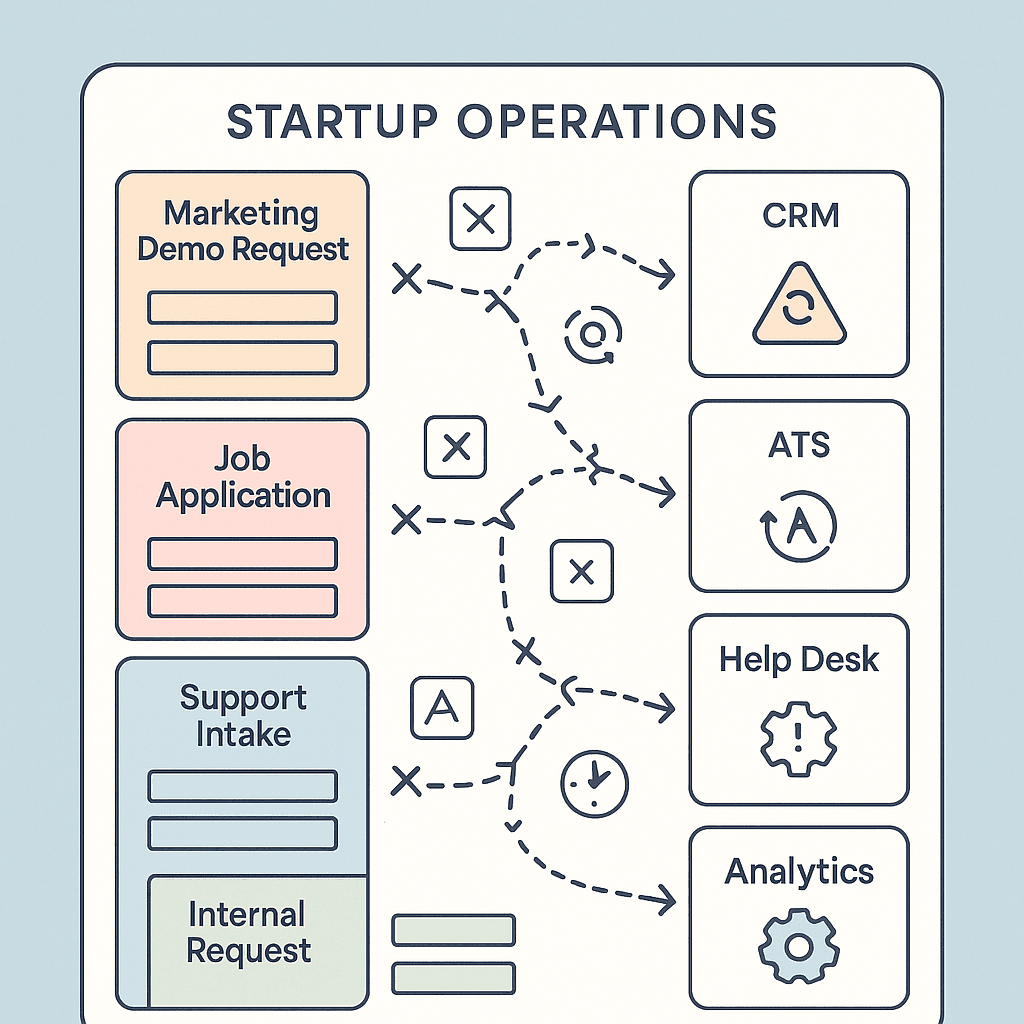
Form logic drift happens when the visible form, the conditional logic behind it, and the systems consuming its data evolve independently. A field gets renamed in HubSpot but the Salesforce mapping doesn’t change. A Typeform branch is added for enterprise leads but the downstream routing rule still assumes the old lifecycle options. A support intake form adds a new severity value, but the help desk workflow only recognizes the original three. A recruiting coordinator adds a mandatory question for one application flow, but the ATS scorecard and EEOC reporting logic still expect the old structure. Someone adds a free-text “How can we help?” field to an internal request form, and now procurement, IT, and legal requests all arrive as unstructured mush.
Because each individual change seems small, nobody calls it architecture. But that’s what it is. And once the architecture is unmanaged, every function starts paying the tax.
The failure mode is especially brutal in startups because forms sit at the edge of the company. They are where external demand and internal work first become data. If your intake layer is unstable, every system behind it becomes harder to trust: CRM, ATS, ticketing, BI, warehouse, workflows, and now AI.
Let’s make this concrete.
A real failure scenario
Imagine a B2B SaaS startup at 80 people.
The stack looks normal enough:
- HubSpot for marketing forms and lifecycle automation
- Salesforce for sales ops and reporting
- Typeform for higher-conversion demo requests and event follow-up
- Greenhouse or Lever for job applications
- Zendesk or Intercom for support intake
- Airtable and Slack forms for internal requests
- Segment or native event tracking feeding a warehouse
- Zapier, Make, Workato, or n8n connecting everything
- A couple of LLM-based workflows doing classification, enrichment, and summarization
Over two years, the company ships a lot. GTM launches a new enterprise motion. Product introduces a security review path. Recruiting opens an EMEA office. Support creates a premium escalation lane. Ops adds a vendor request intake. Nobody pauses to design an intake governance model because it feels bureaucratic, and honestly there are more urgent fires.
So the company does what startups do: it edits forms in place.
Here’s what accumulates:
- Demo request drift
The original demo request form had these fields:
- Work email
- Company name
- Team size
- Country
- What are you evaluating?
Later, marketing adds “Use case” as a dropdown. Sales asks for “CRM in use.” RevOps changes “Team size” option labels. Product marketing introduces an enterprise branch that asks about SSO and compliance. Someone replaces “Country” with “Region” for shorter completion time. A growth experiment removes company name on mobile. Another experiment adds hidden UTM fields but only on one embed version.
Result:
- Salesforce territory rules still route on the old Country field
- Reporting now has both Team Size and Employee Range, depending on source
- Some leads enter without company name, breaking enrichment confidence
- AI lead scoring uses Use Case values that no longer match the prompt assumptions
- Paid campaign attribution is patchy because one form version dropped hidden field capture
- Hiring intake drift
Recruiting started with a standard application. Then each team customized.
Engineering asks for GitHub and work authorization. Sales asks for quota attainment. Design asks for portfolio URL. One hiring manager adds “Years of AI experience” as a required field. EMEA roles include compensation expectations in local currency. US roles ask voluntary demographic questions through a separate flow, but one localized page embeds the wrong version.
Result:
- Screening consistency collapses across roles
- Some candidate data lands only in notes, not structured fields
- Reporting on source, authorization, and stage conversion becomes unreliable
- You accidentally collect sensitive information in countries or roles where you shouldn’t
- Candidate ranking workflows trained on historical fields degrade because inputs are sparse or mismatched
- Support intake drift
Support originally used a simple contact form and inbox. Then the company launched enterprise contracts.
Now there’s a severity selector, contract tier detection, product area mapping, environment, and an outage checkbox. CS asked for account owner auto-assignment. Engineering added “reproduction steps” guidance. One team changed severity labels from P1/P2/P3 to Critical/High/Normal, but the on-call workflow still keys off P1. Another region translated the form manually and used slightly different issue category values.
Result:
- True critical tickets don’t page on-call reliably
- SLA metrics are wrong because premium accounts aren’t consistently tagged
- Product issue trends are polluted by category mismatch
- Summarization bots produce inconsistent incident handoffs because required context is missing in some flows
- Internal request drift
Internal forms are the sleeper issue. Legal intake, IT access, procurement, finance approvals, security reviews, and data requests often start as Airtable forms, Google Forms, Notion forms, or Slack workflows. They multiply fast.
Every team tweaks fields without coordinating terminology. “Department” becomes “Function.” “Business owner” becomes “Requester manager.” Risk levels differ by form. Attachments aren’t standardized. Approval paths are partly in spreadsheets and partly tribal knowledge.
Result:
- Nobody can measure request volume or turnaround across functions
- Approval automation fails when expected fields are blank or named differently
- Data access requests create audit risk because purpose, approver, and retention details are inconsistent
- Internal AI assistants cannot reliably route or answer because each form expresses the same request differently
At first these look like isolated nuisances. They’re not. They’re one pattern.
The pattern: your intake layer is acting like product code, but you’re managing it like page copy
Founders often understand schema control in engineering contexts. They know that if you change a database schema, event name, or API contract casually, things break. You version payloads. You deprecate fields. You coordinate downstream consumers. You monitor failures.
But intake forms often live outside that discipline because they are owned by marketing, recruiting, support, or operations teams using no-code tools.
That creates a dangerous illusion: because a form is editable in a UI, it feels low-risk.
In reality, a form is a public interface plus a branching logic engine plus a data contract plus a compliance surface.
Every field carries at least five jobs:
- User experience: helping someone submit the right information
- Operational routing: deciding what happens next
- System mapping: landing in the right objects and properties
- Reporting: becoming a trustworthy dimension or measure
- Automation: triggering workflows, enrichment, scoring, summaries, approvals, or AI actions
If one field changes, all five jobs may change.
This is why form logic drift is so corrosive. It doesn’t just create bad UX. It creates silent disagreement between systems.
And silent disagreement is much more expensive than visible breakage.
When something goes visibly down, someone fixes it. When your lead routing is 8% wrong, candidate data is 12% incomplete, support severity is inconsistently tagged, and internal approvals are 20% slower, the company just adapts. Humans compensate. Reps manually reroute leads. recruiters ask follow-ups over email. support managers retag tickets. ops people maintain lookup tables in their heads.
That compensation masks the root problem while increasing labor costs, reporting distrust, and decision latency.
Why the standard advice fails
Most advice about forms falls into one of a few buckets:
- Optimize for conversion
- Keep forms short
- Add progressive profiling
- Use conditional logic
- Connect your tools with automation
- Standardize naming where possible
None of this is wrong. It’s just incomplete.
The standard playbook treats forms as top-of-funnel UX objects. But in startups, forms are operational entry points. Once the company grows past a handful of workflows, conversion optimization alone becomes a trap.
Here’s where common advice breaks.
“Just let each team own its forms”
This works until teams create different definitions for the same concept. Company size, urgency, region, department, customer tier, and request type all start splintering. Local optimization creates global entropy.
“Use no-code automation to connect everything”
Automation amplifies schema mistakes. A brittle Zap is not governance. If source values drift, workflows silently branch the wrong way or stop matching conditions altogether.
“Add AI to classify messy submissions”
AI helps at the edges, but it is not a substitute for controlled structure. If you’re using LLMs to infer fields that should have been explicitly captured, you’re paying model cost and introducing probabilistic behavior where deterministic routing was available. AI should resolve ambiguity, not compensate for preventable schema chaos.
“Keep free-text fields so users can explain their needs”
You do need free text in many contexts. But free text without structured scaffolding turns every downstream process into manual interpretation. That’s survivable at 20 requests per month, not 2,000.
“Reporting can be fixed in the warehouse”
Sometimes, yes. Often, no. You can normalize some historical mess downstream, but you cannot reliably reconstruct omitted fields, missing consent, or logic paths that were never captured. Warehouses are good at transformation, not resurrection.
“Ops can clean it up later”
This is the classic startup trap. By the time ops is staffed and ready to clean it up, dozens of forms, hundreds of properties, and thousands of records have already drifted. Retroactive cleanup becomes both political and technically annoying because every team has built habits around the current mess.
The better approach: treat intake as a governed interface layer
You do not need heavyweight enterprise MDM to solve this.
What you need is a minimum viable intake architecture: a lightweight but explicit system for controlling fields, logic, mappings, versions, and changes across forms.
The goal is not perfect centralization. The goal is controlled flexibility.
Here’s the practical model.
- Separate canonical fields from presentation fields
This is the core idea.
A canonical field is the approved company-wide data definition used downstream. Example:
- canonical_company_size_band
- canonical_country_code
- canonical_request_severity
- canonical_department
- canonical_work_auth_status
- canonical_customer_tier
A presentation field is what a user sees in a given form. It may differ by context for UX reasons.
For example, your marketing form might ask:
- “How many people are on your go-to-market team?”
Your recruiting form might ask:
- “Which office are you applying to?”
Your support form might ask:
- “How urgent is this issue?”
These are presentation-layer choices. But each one should map into a canonical schema with documented allowed values.
This lets teams optimize wording and UX without forking the company’s data model.
- Define field classes
Not all fields deserve the same control. Create classes:
- Core identity fields: email, company, candidate ID, account ID
- Routing fields: region, product line, severity, request type, department
- Compliance-sensitive fields: consent, demographics, work authorization, personal data, security data
- Reporting fields: source, campaign, role family, issue category, contract tier
- Context fields: free-text description, portfolio URL, reproduction steps
Core, routing, and compliance-sensitive fields need stricter governance than context fields.
This prevents over-engineering every single input while protecting the fields that can actually break the business.
- Create a form schema registry
This sounds grander than it is.
A schema registry can start as a Notion database, Airtable, or spreadsheet, though eventually a proper repo-backed spec is better.
For each field, capture:
- Canonical name
- Human-readable definition
- Field class
- Allowed values and labels
- Data type
- Owning team
- Systems of record
- Forms where used
- Downstream dependencies
- Compliance notes
- Version history
- Deprecation status
For each form, capture:
- Form name and owner
- Purpose
- URL or embed locations
- Current version
- Triggering logic/branches
- Mapped canonical fields
- Downstream destinations
- Automation dependencies
- Last reviewed date
This alone reveals how much hidden architecture you actually have.
- Introduce change rules, not endless approvals
Startups don’t need a ticket committee for every copy tweak. They do need clear rules for what can change unilaterally.
A useful rule set:
Low-risk changes: owner can ship
- Placeholder text
- Help text
- Styling
- Question order when logic and mappings are unchanged
Medium-risk changes: notify dependent owners
- Label changes for structured fields
- Required/optional changes
- Adding presentation fields that map to existing canonicals
- New conditional branches without new canonical values
High-risk changes: review required
- New canonical fields
- Changes to allowed values
- Renaming or deleting mapped fields
- Logic changes affecting routing, compliance, or eligibility
- Changes to sensitive data collection
- Changes to system mappings or automation triggers
This is the operational sweet spot. Teams retain speed, but risky changes stop being silent.
- Version forms and value sets
Most startups version code but not forms. Big mistake.
At minimum, version:
- Form structure
- Conditional logic
- Allowed value sets for controlled fields
- Mapping tables
When a value changes from “P1” to “Critical,” that is a version event. When “Team size” options change bands, that is a version event. When a demo request branch asks enterprise security questions only for certain segments, that is a version event.
You need to know when the change happened, why, who approved it, and which downstream systems were updated.
Even simple versioning beats mystery archaeology later.
Implementation details: the minimum viable intake architecture
Here’s a practical architecture most startups can implement without turning into SAP.
Layer 1: Collection tools
These are the form front ends:
- HubSpot forms
- Typeform / Tally / Fillout
- Greenhouse / Lever application forms
- Zendesk / Intercom intake
- Airtable / Google Forms / Slack workflows for internal requests
Recommendation: keep the number of collection tools limited. Every extra tool increases drift risk.
A reasonable startup standard:
- Marketing and sales intake: HubSpot plus maybe one flexible form tool like Typeform or Fillout
- Hiring: ATS-native forms whenever possible
- Support: help desk-native intake
- Internal requests: one standard platform, not five
Tool comparison:
HubSpot forms
- Pros: native CRM mapping, lifecycle integration, decent governance if managed well
- Cons: can sprawl fast, hidden fields and embeds drift easily, limited advanced branching compared to specialized tools
Typeform
- Pros: excellent UX, strong conditional flows, good for qualification
- Cons: easy to create disconnected logic, downstream mapping discipline often weak
Fillout / Tally
- Pros: flexible, modern, often better data handling than older lightweight tools
- Cons: still requires strong mapping and governance; flexibility cuts both ways
ATS-native forms
- Pros: better compliance alignment, direct candidate object mapping
- Cons: hiring managers may circumvent them with custom landing pages or external forms
Zendesk / Intercom native intake
- Pros: best alignment with ticketing workflows and SLAs
- Cons: teams often bolt on side forms for special cases and forget to sync logic
Airtable / Slack / Google Forms for internal use
- Pros: fast to deploy
- Cons: highest entropy risk; weak controls, weak versioning, lots of tribal workflows
Layer 2: Canonical schema and mapping
This can live in:
- A spreadsheet/Airtable in early stage
- dbt models plus YAML specs in a more mature data stack
- A lightweight repo with JSON/YAML field definitions if you want engineering-grade control
This layer defines the allowed values and mappings.
Example:
Presentation values:
- “1-10 employees”
- “11-50 employees”
- “51-200 employees”
- “201-1000 employees”
- “1000+ employees”
Canonical values:
- SMB
- Mid-market
- Enterprise
Mapping table:
- 1-10 -> SMB
- 11-50 -> SMB
- 51-200 -> Mid-market
- 201-1000 -> Enterprise
- 1000+ -> Enterprise
This is where you control semantics. Do not leave semantics implied in form copy.
Layer 3: Workflow engine
This is where routing and automation live:
- HubSpot workflows
- Salesforce flows
- Zapier / Make / Workato / n8n
- ATS automations
- Help desk triggers
- Internal approval workflows
Rule: workflows should rely on canonical values where possible, not arbitrary raw labels from individual forms.
Bad:
- If form field equals “Critical” then page on-call
Better:
- If canonical_request_severity = sev_1 then page on-call
This protects automation from cosmetic or local wording changes.
Layer 4: Observability and QA
Most startups have zero instrumentation here. Fix that.
Track:
- Submission volume by form version
- Null rate by critical field
- Unknown/unmapped value rate
- Routing exceptions
- Automation failure rate
- Manual override rate
- Time-to-triage by intake path
- Duplicate field usage across forms
If you add AI workflows, also track:
- Model fallback rate due to missing fields
- Classification confidence by form version
- Human correction rate
- Prompt/schema mismatch incidents
If these sound too “enterprisey,” remember what the alternative is: humans discovering data quality issues three months later during a board metric review or a customer escalation.
A practical governance workflow
Here’s a process that works without killing speed.
Step 1: Inventory every intake surface
List every external and internal form that creates, updates, or classifies work.
That includes:
- Contact us
- Demo request
- Trial signup qualification
- Webinar follow-up
- Partner application
- Job application
- Referral form
- Support request
- Enterprise escalation
- Security review intake
- Vendor request
- Procurement request
- Access request
- Data deletion/privacy request
- Legal request
- Finance approval request
Most companies underestimate this count by 30–50%.
Step 2: Identify the top 20 drift-prone fields
Don’t start with every field. Start with the ones whose inconsistency hurts routing, reporting, compliance, or automation.
Typical top 20:
- Country / region
- Company size
- Role / department
- Request type
- Severity / priority
- Customer tier
- Product area
- Consent status
- Work authorization
- Employment location
- Source / campaign
- Account owner
- Business justification
- Approver
- Environment
- Issue category
- Contract type
- Security need
- Budget range
- Use case
Step 3: Assign field owners
This is important. A field without an owner is a future incident.
Ownership does not mean one team edits all forms. It means one accountable person defines the canonical meaning and approves risky changes.
Examples:
- Company size: RevOps
- Work authorization: Recruiting Ops + Legal
- Severity: Support Ops
- Department/function: People Ops or BizOps
- Consent: Legal or Marketing Ops depending on context
Step 4: Establish allowed value sets
Controlled vocabulary beats creative synonyms.
Bad:
- Urgent, High, ASAP, Critical, P1, Blocking
Good:
- sev_1, sev_2, sev_3, sev_4 as canonical values
- labels can vary by UI, but mapping is explicit
This is especially critical for multilingual forms, regional teams, and AI consumers.
Step 5: Add pre-publish checks
Before a form change goes live, verify:
- Are any canonical fields added, changed, or removed?
- Did allowed values change?
- Do downstream mappings still work?
- Do automation rules still match?
- Are hidden fields and attribution params preserved?
- Are required fields still appropriate?
- Did we alter any compliance-sensitive data collection?
- Is the change logged with version/date/owner?
This can be a checklist in Notion at first. It doesn’t need a platform.
Step 6: Build a drift review cadence
Monthly is enough for many startups.
Review:
- New forms created since last review
- Fields with high null or override rates
- Unknown values appearing downstream
- Broken workflows and manual reroutes
- Sensitive fields collected unexpectedly
- Reporting discrepancies traced to form changes
This is the boring hygiene that prevents expensive chaos.
Cost and time analysis
Founders usually ask: is this worth it for a startup?
Yes, because drift creates both visible and hidden costs.
Visible costs:
- Missed or misrouted leads
- Slower candidate screening
- SLA breaches
- More manual triage
- Broken reports
- Compliance remediation
Hidden costs:
- Lower trust in systems
- Longer onboarding for ops staff
- Dependence on a few people who know “how it really works”
- AI initiatives that underperform because source data is unstable
- Strategy errors from polluted reporting
Rough startup math:
Assume:
- 1,000 monthly inbound/demo submissions
- 800 support intakes
- 500 job applications
- 300 internal requests
If just 5% require manual cleanup or rerouting due to drift, that’s 130 exceptions per month.
If each exception costs 10 minutes of human time across sales ops, support ops, recruiting, or admins, that’s 1,300 minutes, or roughly 22 hours/month.
At a fully loaded blended ops cost of, say, $60–$100/hour, that’s $1,300–$2,200/month in direct labor just for known exceptions.
That does not include:
- missed enterprise meetings because routing was wrong
- candidates lost from a broken workflow
- support escalations mishandled
- reporting errors affecting decisions
- compliance exposure
Now compare that to the cost of implementing minimum governance:
Initial setup
- 1–2 weeks of ops/data work to inventory forms and define core fields
- 3–5 stakeholder meetings to assign ownership and rules
- a few workflow updates to route off canonical values
Ongoing maintenance
- 2–4 hours per month for drift review and change logging at smaller scale
- more if you’re high-volume or heavily regulated
That is usually a trivial cost compared to the recurring operational tax.
Where AI workflows fail first
This topic matters even more now because startups are layering AI onto intake and operations.
AI is unusually sensitive to drift because prompts and tool calls assume stable inputs.
Examples:
Lead qualification agent
- Prompt expects fields: company_size, crm_in_use, use_case, region
- But one form now collects employee_band, current_stack, need, geography
- Result: degraded scoring, more hallucinated inference, lower confidence
Support summarization bot
- Expects severity, product area, environment, repro steps
- Some forms provide only free text and account email
- Result: low-quality handoffs, missed urgency, inconsistent escalation recommendations
Recruiting screening workflow
- Expects work authorization, location, years of experience, role family
- Custom application pages omit or rename one field
- Result: false rejects or noisy rankings
Internal request router
- Expects request_type, data sensitivity, approver, needed_by_date
- Slack workflow captures a paragraph instead
- Result: AI classifier becomes gatekeeper for information that should have been structured at source
The rule is simple: AI is not a schema strategy.
Use AI for:
- summarizing free-text context
- proposing category mappings for unknown values
- flagging anomalous submissions
- drafting responses or next steps
Do not use AI as your primary substitute for canonical field design.
A workflow example: demo request done right
Let’s say you want a flexible, conversion-optimized demo request process without drift.
A strong design looks like this:
Frontend form
- Ask minimal visible questions initially
- Use conditional logic for relevant follow-ups
- Keep wording optimized for conversion
Canonical mapping
- Map visible responses into controlled internal fields:
- canonical_geo
- canonical_company_size_band
- canonical_use_case
- canonical_security_need
- canonical_source_campaign
Routing layer
- Territory assignment keys off canonical_geo
- Enterprise queue logic keys off canonical_company_size_band and canonical_security_need
- SDR/AE path keys off canonical thresholds, not form labels
Observability
- Daily check for null rate on canonical_company_size_band
- Alert if unknown use_case values exceed threshold
- Weekly audit of routing overrides by rep
Versioning
- If marketing changes size bands or use-case labels, update mapping table and log version
- If security questions are introduced for a new segment, downstream enterprise routing test cases are rerun
This gives marketing room to test UX while preserving operational integrity.
A workflow example: internal requests done right
Internal intake is where simple architecture pays off fast.
Instead of separate ad hoc forms for IT, legal, procurement, and data access, standardize around one request framework with:
Required canonical fields
- requester
- department
- request_domain
- request_type
- urgency_level
- business_justification
- approver
- needed_by_date
- sensitivity_level
Domain-specific sections
- IT access specifics
- vendor/procurement details
- contract/legal details
- data access attributes
Benefits:
- one shared routing model
- one reporting layer across functions
- common approval metadata
- easier SLA management
- much better base for internal AI assistants
What to do in the next 30 days
If your forms are already drifting, don’t try to boil the ocean.
Week 1: inventory and triage
- List all forms and owners
- Identify downstream systems per form
- Mark which forms affect revenue, hiring, support SLAs, or compliance
- Flag duplicate fields with inconsistent definitions
Week 2: define the canonical core
- Choose top 10–20 fields to govern first
- Create canonical names and allowed values
- Document mapping from existing presentation fields
- Assign owners
Week 3: stabilize critical workflows
- Update routing and automations to rely on canonical values
- Patch broken mappings
- Add fallbacks for unknown values
- Remove or constrain the most dangerous free-text-only workflows
Week 4: establish operating rules
- Add change classification rules
- Create a simple version log
- Introduce pre-publish checklist
- Schedule monthly drift review
You do not need perfection in 30 days. You need control over the fields that matter most.
Takeaways
Form logic drift is one of those startup problems that feels small until it quietly contaminates everything.
When forms evolve without schema control, the damage spreads across GTM, hiring, support, internal operations, reporting, compliance, and AI workflows. The reason it persists is simple: forms still “work” at the surface while systems behind them stop agreeing on what the data means.
The fix is not bureaucracy for its own sake.
It is to treat intake as a governed interface layer.
That means:
- defining canonical fields
- separating UX wording from backend semantics
- assigning ownership for high-risk fields
- controlling allowed values
- versioning forms and mappings
- adding lightweight change rules
- instrumenting drift before it becomes business folklore
If you’re a founder or operator, this is one of those unglamorous infrastructure moves that compounds.
Good schema discipline at intake gives you cleaner routing, faster operations, more reliable reporting, lower compliance risk, and a much stronger base for automation and AI.
Bad intake discipline does the opposite: it forces your company to keep reinterpreting its own data by hand.
That’s not scrappy. That’s expensive.
And the earlier you fix it, the less of your future operating model will be built on silent disagreement.