
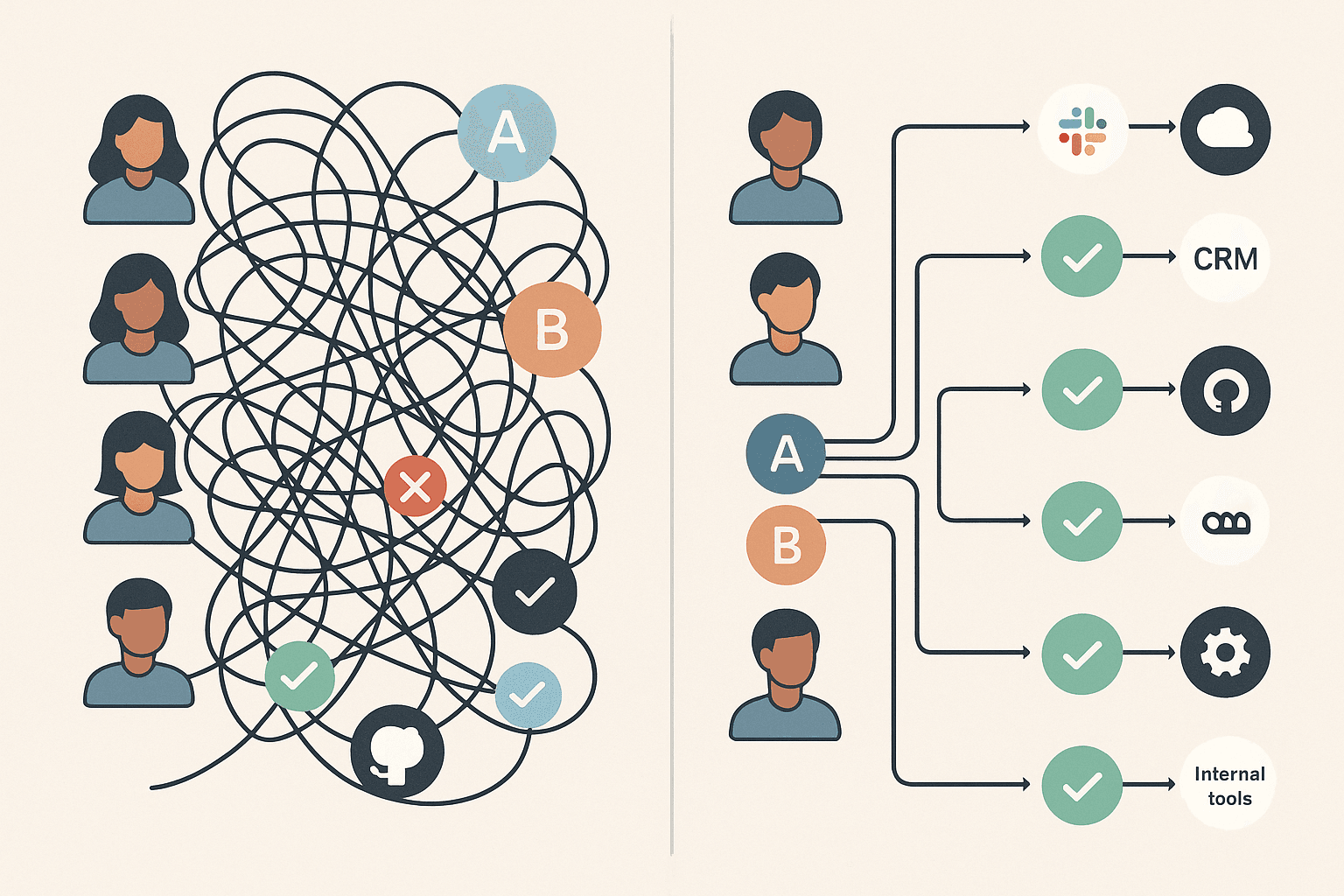
Here’s the failure mode almost every startup creates for itself without realizing it.
A company starts with 8 people. Everyone needs access quickly. The founder adds the first engineer to GitHub as an admin because “we’re moving fast.” The first sales hire gets into the CRM with whatever permissions the last rep had. A contractor needs one folder in Google Drive, so someone shares the whole department drive “for now.” A support lead needs access to billing tools during a customer emergency, so they get added directly, with a promise to clean it up later.
Nobody is thinking about access architecture. They are thinking about shipping, closing, hiring, and surviving.
Then the company grows to 25, then 60, then 120. The early shortcuts harden into operating reality.
Now onboarding works like this: the hiring manager DMs IT, ops, or an engineering manager and says, “Give Priya the same access as Dan, plus Salesforce, but not finance, and she also needs one dashboard in Looker.” Offboarding works like this: HR posts in Slack that someone’s last day is Friday, and six different admins try to remember which apps that person had. Promotions work like this: someone gets a bigger title, but keeps all their previous permissions because nobody wants to break anything. Internal tools work like this: one engineer manually edits an allowlist somewhere in a config file because there is no reliable group source of truth.
That is permission group drift.
It happens when access is managed person-by-person instead of through durable role groups, and over time the relationship between someone’s job and their actual permissions becomes incoherent.
Not just messy. Incoherent.
The same title ends up with three different levels of access. Former contractors retain production visibility. Sales managers can export data they no longer need. Engineers keep admin rights long after they stop being on-call. A departing employee loses Slack and Google Workspace access quickly but still has access to GitHub, the cloud console, the CRM, a feature flagging tool, and two internal dashboards because those systems were manually configured outside the main checklist.
This is one of those startup problems that feels administrative until it becomes existential.
It shows up as:
- inconsistent onboarding that burns manager and IT time
- failed offboarding that leaves accounts and tokens active
- invisible privilege creep as employees accumulate access over time
- broken least-privilege enforcement
- audit pain during enterprise deals or compliance work
- delayed incident response because nobody knows who can do what
- internal mistrust when exceptions become political rather than principled
And the painful part is that most teams think they have an access problem because they lack better tooling.
Usually they have a model problem first.
If your core operating model is “grant access directly to people,” adding more admin software just helps you make inconsistent decisions faster.
The fix is to move from user-centric access management to role-group-centric access management, where job functions map to durable groups, groups map to application permissions, and individual exceptions are treated as temporary deviations that must be tracked and retired.
That sounds obvious when stated cleanly. In practice, most startups do not implement it until the damage is already visible.
Let’s break down why this happens, why standard advice fails, and what a practical replacement actually looks like across Workspace, Slack, GitHub, CRM, cloud, and internal tools.
The real failure scenario: how permission drift compounds across systems
Imagine a B2B SaaS company at 85 employees.
They use:
- Google Workspace
- Slack
- GitHub
- AWS
- Salesforce
- HubSpot for marketing ops
- Jira
- Notion
- Linear
- Retool for internal tooling
- a homegrown admin panel
- a billing platform like Stripe
- a support stack like Zendesk
- an identity provider, maybe partially configured, maybe not
They didn’t design access. They inherited it from urgency.
Phase 1: everyone copies someone else
For the first 20 hires, access is granted by analogy.
- “Make the new AE look like the old AE.”
- “Give this engineer whatever backend has.”
- “Add them to the same Slack channels as Kelly.”
- “He should probably have read-only in AWS, but I’m not sure which policy that is, so give the broader one.”
This creates the first layer of drift because nobody is copying from a clean template. They are copying from another already-mutated user.
If the source employee got extra access during an incident, project, or leadership change, that exception gets cloned.
Now drift becomes hereditary.
Phase 2: role changes accumulate privilege
Then people move.
A support engineer temporarily helps with implementation, so they get CRM and billing access. Later they move back to support, but nobody removes those permissions. A product manager joins a launch war room and gets temporary feature flag admin rights. Months later they still have them. An engineer covers analytics for a quarter and gets BigQuery access, then changes teams and keeps it.
This is the classic privilege creep pattern: access only ratchets upward.
Without role groups, there is no mechanism to say, “Your job changed, so your access baseline changed too.” There are only one-off grants with no strong corresponding revoke event.
Phase 3: system sprawl breaks the checklist
By 50+ people, access lives in too many places.
Some permissions are assigned in the identity provider. Some are local to the app. Some are managed in Google Groups. Some are Slack user groups. Some are GitHub teams. Some are AWS IAM groups or roles. Some are Salesforce profiles plus permission sets. Some are buried inside an internal tool nobody has documented.
Now onboarding is not one workflow. It is 17 mini-workflows with different owners and no authoritative mapping between role and required access.
Offboarding gets worse.
Maybe disabling Google Workspace cuts SSO to several apps, but not all. Maybe GitHub personal access tokens remain valid. Maybe AWS CLI access survives through unmanaged keys. Maybe the contractor’s shared Notion guest access was never tied to identity lifecycle at all.
Everyone believes offboarding is working because the obvious accounts are deactivated.
The dangerous access is usually the non-obvious access.
Phase 4: enterprise customers and auditors ask normal questions
Then sales lands a real enterprise prospect.
Security review asks:
- How do you enforce least privilege?
- How is access provisioned and deprovisioned?
- Are privileges granted based on role?
- How do you review access periodically?
- How do you ensure terminated users lose access across all systems?
- Which employees have production access?
- Which contractors can access customer data?
The startup answers with documents that describe an idealized process nobody consistently follows.
Then someone tries to produce evidence and discovers:
- titles do not map cleanly to app access
- no one can explain why specific users have elevated permissions
- group membership is incomplete and many app permissions are direct user assignments
- there is no central report showing effective access across systems
- managers approve access informally in Slack, with no durable record
This is where permission drift stops being an operational annoyance and becomes revenue friction.
Phase 5: incident response exposes the real cost
Sooner or later, there is a real incident.
Maybe a laptop is stolen. Maybe a disgruntled departing employee is terminated abruptly. Maybe a vendor compromise means all privileged access needs immediate review. Maybe the company narrows production access after a customer trust event.
Suddenly leadership wants answers in an hour:
- Who has admin access to Google Workspace?
- Who can export all CRM records?
- Who can deploy to production?
- Which service accounts are tied to former employees?
- Which contractors still sit in shared Slack channels?
If your access model is person-by-person, you will not answer quickly because there is nothing systematic to inspect. You have to reconstruct reality app by app.
That delay is not just embarrassing. It increases actual risk exposure during the moment when time matters most.
The pattern underneath: permission group drift is an operating system problem
Founders often treat access as an IT admin task. It is not. It is an operating system problem for the company.
Permission group drift appears when five conditions exist together:
- Access is granted directly to users more often than through groups.
- Groups, where they exist, are inconsistent across systems.
- There is no canonical mapping between business roles and access bundles.
- Temporary exceptions are unmanaged and become permanent.
- Offboarding relies on checklists rather than lifecycle-linked revocation.
Once those conditions hold, entropy wins.
The critical insight: drift is not caused by one bad admin. It is caused by a model that makes the path of least resistance dangerous.
If the easiest way to solve a request is “just add Maya directly,” your organization will always accumulate direct grants.
If the easiest way to handle a new hire is “copy Jordan’s permissions,” your organization will always replicate hidden exceptions.
If the easiest way to manage special projects is “we’ll remember to remove this later,” your organization will never remove things later.
So the objective is not to train people to be more careful.
The objective is to redesign access so the default motion is safe.
Why standard advice fails
A lot of access control advice is technically correct and practically useless for startups.
Here are the common versions, and why they fail.
1. “Just implement RBAC”
Yes, role-based access control is the right direction. But “implement RBAC” is like saying “just build finance discipline.”
It does not tell you:
- how many roles you actually need
- where roles should live
- how to handle exceptions without destroying the model
- how to map apps that use different permission constructs
- how to migrate from today’s mess without breaking operations
In startups, the failure is usually not lack of RBAC vocabulary. It is inability to operationalize RBAC across heterogeneous tools.
2. “Use your identity provider for everything”
Also directionally right, often incomplete.
Your identity provider can centralize authentication and some provisioning, but many important permissions still live inside downstream apps.
Examples:
- GitHub team membership and repo admin rights
- Salesforce profiles, roles, and permission sets
- AWS IAM roles and cross-account assumptions
- Slack channel membership and guest access
- internal admin panel feature entitlements
An IdP is not magic. It is a control plane, not the entire state of the world.
If you assume SSO equals access control solved, you will miss the local permissions that matter most.
3. “Run quarterly access reviews”
Quarterly reviews are useful, but if your permission structure is already incoherent, reviews become theater.
Managers get giant CSV exports of users and app entitlements they cannot interpret. They approve everything to avoid breaking work. Or they ignore the review until ops chases them.
A review process cannot compensate for a bad access model. It can only validate a model that already makes sense.
4. “Use least privilege”
Least privilege is a principle, not a workflow.
In early-stage companies, strict least privilege can be overapplied in ways that make people bypass the process entirely. If every request takes three days and ten approvals, admins start granting broader standing access because it is cheaper than repeated friction.
The real challenge is not ideological least privilege. It is maintainable least privilege.
That means defining sane baselines by role, fast time-bound elevation for exceptions, and regular cleanup.
5. “Document your onboarding/offboarding checklist”
Checklists help, but they break under system sprawl.
If you have 25 systems and no central role mapping, your checklist will always lag reality. New tools get added. One team changes process. Contractors use a side workflow. An internal service gets missed.
What startups need is not a better checklist first.
They need a durable access architecture that makes checklists shorter because more of the lifecycle is group-based and automated.
The better approach: design around durable role groups, not individual users
The fix is conceptually simple:
Users should inherit most access from a small number of durable role groups tied to job function.
Then:
- groups should map to app-level permission bundles
- direct user permissions should be rare and visible
- exceptions should be time-bound
- lifecycle changes should change group membership first
- audits should review roles and exceptions, not thousands of raw grants
This is not about creating 200 hyper-specific roles.
That is another failure mode.
You want a practical middle ground:
- stable baseline roles for common job families
- a small set of elevated functional groups
- temporary project or incident groups
- break-glass admin paths with strong logging
Think in layers.
Layer 1: baseline employment access
This includes access almost everyone gets or broad company defaults.
Examples:
- Google Workspace account
- Slack standard user
- core HR system access for self-service
- company wiki/notion read access
- baseline device management
This layer should be almost fully automated from employment status.
Layer 2: functional role groups
These are the durable groups tied to job function.
Examples:
- Engineering - Backend
- Engineering - Frontend
- Product Management
- Sales - Account Executive
- Sales - RevOps
- Customer Success - CSM
- Support
- Finance
- People Ops
These groups should grant the normal baseline access that someone in that job needs to perform day one.
Layer 3: elevated capability groups
These represent higher-risk powers not everyone in a department needs.
Examples:
- GitHub Org Admin
- AWS Production ReadOnly
- AWS Production Deploy
- Salesforce Data Export
- Stripe Refund Operator
- Google Workspace Admin
- Retool App Editor
- Feature Flag Admin
This layer is where least privilege usually matters most.
Layer 4: temporary project/incident groups
These are explicitly temporary.
Examples:
- SOC2 Audit Working Group
- Pricing Migration Project
- On-Call Incident Command
- Customer Escalation Tiger Team
These groups should have expiration dates or mandatory review dates.
Layer 5: break-glass access
For rare cases where someone needs emergency elevated access outside the normal model.
This should be logged, approved, and ideally short-lived.
If break-glass becomes common, your role design is missing something.
What this looks like across common startup tools
The biggest practical hurdle is that every tool expresses permissions differently. That does not mean you cannot use the same model.
You can.
You just need a cross-system role map.
Google Workspace
Use Google Groups as much as possible for shared resources.
Map examples:
all-employees@eng-backend@sales-ae@finance@contractors@workspace-admins@
Use groups to drive:
- shared drive access
- mailing lists
- calendar/resource access
- access to downstream apps where group sync is supported
Common drift problem: folders and docs shared directly to people.
Fix: move critical shared resources to group-based sharing and review external guests aggressively.
Slack
Slack is usually a hidden access mess because people focus on app/admin access and ignore communication exposure.
Map groups to:
- default channels by function
- private channels for sensitive teams
- user groups for notification routing
- guest vs full member policies
Common drift problem: contractors or former project members remain in private channels containing sensitive commercial or product context.
Fix: use default channel logic by group, minimize manual private-channel sprawl, and review guest memberships monthly.
GitHub
GitHub is one of the clearest examples of why direct user management breaks.
Use teams, not individual repo grants, wherever possible.
Map role groups to:
- org membership tier
- team membership
- repo access levels
- CODEOWNERS implications
- admin vs maintain vs write vs read
Common drift problem: direct repo admin grants during emergencies, plus former engineers retaining access to sensitive repos through old teams.
Fix: require repos to be team-managed, audit direct collaborators, and separate production-sensitive repos into narrower elevated teams.
CRM: Salesforce or HubSpot
CRM access drift becomes especially dangerous because it touches customer data, pricing, forecasting, and exports.
Map role groups to:
- profile or seat type
- permission sets
- territory/record visibility model
- export capability
- admin capabilities
Common drift problem: leaders and operations staff accumulate broad export and edit rights that never get removed.
Fix: define explicit elevated capabilities like “Data Export” and “Admin Config,” not just department-level access.
Cloud: AWS, GCP, Azure
Cloud permissions are where startup sloppiness gets expensive.
Map role groups to:
- account access
- environment access: dev/staging/prod
- role assumption pathways
- read-only vs deploy vs admin
- secrets management access
Common drift problem: too many humans have standing production permissions because it was simpler than setting up proper assumption roles.
Fix: heavily separate production access from standard engineering access, prefer role assumption, and keep standing admin membership tiny.
Internal tools
Internal tools are often the least governed and most dangerous.
Retool, custom admin panels, analytics dashboards, support scripts, and feature flag tooling often expose sensitive customer data or operational actions.
Common drift problem: permission logic is hand-coded per user or tied to stale email allowlists.
Fix: wire internal tools to group claims from your identity layer or a central directory source and stop managing entitlements in code where possible.
A practical implementation plan for startups
You do not need a six-month identity transformation program.
You do need a disciplined 4- to 8-week cleanup project with clear ownership.
Here is a practical sequence.
Step 1: pick a source of truth for identity lifecycle
For most startups, this is:
- HRIS as source of employment state
- IdP as source of authentication and core group claims
Example stack:
- HRIS: Rippling, BambooHR, Deel, Gusto plus add-ons
- IdP: Okta, Google Workspace, Microsoft Entra, JumpCloud
If you lack an IdP and are under 30 people, Google Workspace can carry more weight temporarily, but once app count and compliance pressure rise, a dedicated IdP usually becomes worth it.
Step 2: inventory every system that matters
Create a real inventory, not a hand-wavy list.
For each system capture:
- system owner
- auth source
- provisioning method
- deprovisioning method
- permission model available
- high-risk privileges
- whether groups are supported
- whether direct user grants exist
- whether contractors can be present
You will likely find orphaned tools and unknown admins during this step alone.
Step 3: define 8 to 20 durable role groups
Start small.
Most startups overcomplicate role design if they begin from org chart nuance.
Start from repeated job functions.
Example initial set:
- All Employees
- Contractors
- Engineering
- Engineering - Prod Elevated
- Product
- Design
- Sales - AE
- Sales - Manager
- Revenue Operations
- Marketing
- Customer Success
- Support
- Finance
- People Ops
- IT/Admin
- Security Elevated
Then add app-specific elevated groups separately instead of exploding baseline roles.
Bad model:
- Engineering Backend Senior Platform API Oncall
Better model:
- Engineering
- AWS Prod ReadOnly
- AWS Prod Deploy
- PagerDuty OnCall
- GitHub Sensitive Repos
Step 4: map each app to groups
Build a matrix.
Example:
| App | Group | Permission |
|---|---|---|
| Slack | All Employees | Member |
| GitHub | Engineering | Standard eng teams |
| GitHub | Engineering - Prod Elevated | Sensitive repo write |
| Salesforce | Sales - AE | Seller profile |
| Salesforce | Revenue Operations | Admin-lite + reporting |
| AWS | Engineering | Dev/Staging read-write |
| AWS | AWS Prod ReadOnly | Prod read |
| AWS | AWS Prod Deploy | Prod deploy role |
| Stripe | Finance | Reporting |
| Stripe | Support | Refund limited |
This matrix becomes the operational backbone.
Step 5: identify and classify all direct user grants
Now find every place where permissions are assigned directly to individuals.
Classify each one:
- should move to existing group
- requires creation of new durable group
- temporary exception
- obsolete, remove now
This is where the cleanup work actually lives.
A useful rule: if three or more people have the same “exception,” it is not an exception. It is an unmodeled role.
Step 6: create an exception process with expiration
You will never eliminate exceptions entirely.
That is fine.
What kills teams is unmanaged exceptions.
A workable policy:
- every exception needs owner, reason, approver, grant date, review date
- default exception lifetime is 30 or 90 days
- exceptions must either expire, renew with approval, or be converted into a group if recurrent
If your tooling supports temporary access natively, use it. If not, even a simple tracked register is better than Slack archaeology.
Step 7: tie onboarding, transfers, and offboarding to group changes
This is the key process shift.
Do not think of onboarding as “create accounts in 20 apps.”
Think of onboarding as:
- create identity
- assign baseline groups
- let downstream provisioning and access inheritance occur
- add only approved elevated groups if needed
For transfers:
- remove old functional groups
- add new functional groups
- review elevated groups explicitly
For offboarding:
- terminate identity
- remove all group memberships
- revoke sessions/tokens/keys where applicable
- validate high-risk systems separately
This reduces lifecycle management to group state changes rather than bespoke app-by-app memory.
Step 8: run one painful cleanup sprint
There is no way around this.
Your first cleanup will be annoying.
People will say:
- “Don’t remove that, I might need it later.”
- “This will slow us down.”
- “We’ve always done it this way.”
- “I’m special-cased because I work across teams.”
Some of those objections are real. Many are just inertia.
Run the sprint anyway.
Focus first on high-risk systems:
- identity provider / workspace admin
- cloud production access
- GitHub admin/repo direct grants
- CRM export/admin rights
- billing systems
- internal admin tools
You do not need perfection everywhere on day one. You do need control where blast radius is highest.
Tool comparisons: what helps and what does not
Tooling matters, but only after the model is clear.
Identity providers
Okta
- Strong ecosystem and mature lifecycle features
- Good for scaling and compliance-heavy sales motions
- Expensive relative to early-stage budgets
- Often underconfigured by startups that buy it too early
Microsoft Entra ID
- Strong if you are already in the Microsoft ecosystem
- Good group and conditional access capabilities
- Can feel heavyweight for Google-centric startups
Google Workspace as lightweight control plane
- Cheap and familiar
- Works surprisingly well early if you standardize groups
- Weaker than dedicated IdPs for deeper provisioning/governance use cases
JumpCloud
- Useful for mixed identity/device management cases
- Often a practical middle option
- Ecosystem depth can vary by use case
Practical advice: if you are under ~30 people and mostly on Google Workspace, you can often get significant improvement just by cleaning up groups and app mappings. Once you have enterprise deals, many contractors, or 20+ serious apps, a dedicated IdP usually pays for itself.
Provisioning and access management tools
SCIM-capable app provisioning
- Great where supported
- Reduces create/deactivate errors
- Does not solve app-local permission design by itself
Dedicated SaaS management / access governance tools
- Can improve visibility and offboarding coverage
- Helpful for detecting shadow apps and direct assignments
- Often become expensive before companies have the process maturity to use them well
Practical advice: buy visibility if your app sprawl is severe, but do not outsource role design thinking.
Cloud IAM tooling
Native cloud IAM is powerful but easy to misuse.
- AWS IAM Identity Center can centralize workforce access well
- Role assumption is far better than standing credentials
- Unmanaged access keys are poison for lifecycle control
Practical advice: if you still have multiple humans with long-lived admin keys, that problem is more urgent than almost any SaaS cleanup.
Workflow example: bad vs good onboarding
Bad onboarding workflow
- Manager submits a ticket: “Make new PM look like Alex.”
- IT grants Google, Slack, Notion.
- Product lead manually invites to Jira and Linear.
- Engineer adds them to internal admin panel later.
- PM asks for analytics access in Slack.
- Someone grants broad Looker access directly.
- During launch week, PM gets feature flag admin rights.
- Nobody records the exception.
Time spent:
- 1 to 3 hours of fragmented admin work
- 2 to 5 days of back-and-forth
- high chance of overprovisioning and missed systems
Good onboarding workflow
- HRIS marks new hire active with department and role.
- Identity account is created automatically.
- User is assigned:
- All Employees
- Product
- Downstream apps provision baseline access.
- Manager requests one elevated group if needed:
- Feature Flag Approver
- Exception expires after 90 days unless renewed.
Time spent:
- 10 to 20 minutes of actual human review
- same-day readiness
- lower variance between similar hires
Workflow example: transfer and offboarding
Bad transfer
Engineer becomes engineering manager. They keep:
- old repo admin rights
- old incident credentials
- old cloud deploy access
- new management dashboards
- additional HR-related reporting access
Their access is now a sedimentary layer cake of every job they’ve ever had.
Good transfer
- Remove
Engineering - IC baseline. - Add
Engineering - Manager baseline. - Trigger explicit review of elevated groups:
- keep GitHub Sensitive Repos? maybe yes
- keep AWS Prod Deploy? maybe no
- add headcount planning dashboards? yes
- Log decision owner.
Bad offboarding
- Disable Google account.
- Post “done” in Slack.
- Forget shared AWS role, GitHub PAT, Notion guest, and CRM direct login.
Good offboarding
- HRIS status changes to terminated.
- IdP suspends sign-in and revokes sessions.
- Core apps deprovision via SCIM where available.
- Group memberships removed automatically.
- High-risk checklist validates:
- cloud console/CLI access
- GitHub org/repo access and tokens
- CRM access
- billing and support tooling
- internal admin systems
- Exceptions and manually managed accounts reviewed to zero.
Cost and time analysis
Founders often avoid this cleanup because it feels expensive.
The hidden cost of not doing it is usually higher.
Cost of staying ad hoc
At 75 employees:
- onboarding/offboarding overhead: 1 to 3 admin hours per employee event
- manager interruptions: repeated clarification and approvals
- security review prep: 20 to 60 hours of scramble per enterprise deal or audit cycle
- incident response drag: hours lost identifying actual privilege holders
- risk of data exposure or failed revocation: potentially enormous
Even ignoring security incidents, the labor waste adds up fast.
If you hire 5 to 10 people per month and every lifecycle event burns multiple people’s time, you are quietly spending a meaningful fraction of an ops salary on rework.
Cost of a cleanup project
Typical 4- to 8-week effort for a 50- to 150-person startup:
- owner: IT/ops/security lead at 25 to 50% time
- engineering/admin support: a few hours per app owner
- manager review time: concentrated during role definition and cleanup
- possible tool cost: IdP upgrade, provisioning connectors, or governance add-on
Roughly:
- if mostly internal labor, maybe $10k to $40k equivalent effort
- if new tooling is added, perhaps another $5k to $30k+ annually depending on stack and headcount
That sounds nontrivial. But compare it to:
- one delayed enterprise deal due to weak access controls
- one messy employee departure with lingering access
- one internal audit fire drill every quarter
- one production access mistake caused by invisible privilege creep
This is one of those boring control investments that usually pays back in both reduced risk and faster operations.
Common tradeoffs and traps
Be direct about the tradeoffs.
Tradeoff 1: fewer roles vs more precision
Too few roles means overbroad access. Too many roles means nobody can manage the model.
For most startups, the right answer is fewer baseline roles and more small elevated capability groups.
Tradeoff 2: speed vs control
If access changes are too slow, teams route around the process.
Design for fast approvals on common requests. Reserve heavy review for truly high-risk privileges.
Tradeoff 3: centralization vs local ownership
A pure central IT model often fails because app owners understand real access needs better.
Best model:
- central owner defines framework and lifecycle process
- app owners define permission mapping for their systems
- managers approve user membership changes within that framework
Trap 1: trying to fix every app equally
Do not spend week one perfecting Figma access if your AWS prod access is wild west.
Sequence by risk.
Trap 2: leaving internal tools for later forever
Internal tools frequently have the worst controls and highest hidden sensitivity.
Include them early.
Trap 3: allowing direct grants without visibility
If direct grants must exist, they need to be queryable and reviewed.
Invisible exceptions are how the model decays again.
Trap 4: no owner for group taxonomy
If no one owns role/group design, entropy returns.
Someone must own:
- group naming
- role lifecycle
- exception policy
- review cadence
- app mapping changes
A lightweight governance model that actually works
You do not need a giant governance committee.
A startup-ready model looks like this:
Owner: IT/Ops/Security lead
- maintains role/group catalog
- runs quarterly exception and elevated-access review
- coordinates offboarding coverage
App owners: system-specific admins
- map app permissions to approved groups
- eliminate direct user assignments where possible
- review elevated access in their system
Managers: people access approvers
- approve baseline role assignment for hires
- approve exceptions for their team
- confirm transfers remove obsolete access
HR/People: lifecycle trigger owner
- ensures hire/transfer/termination changes hit source systems on time
This is enough for most startups if the underlying group model is solid.
The operating rule to adopt
Here is the simple rule I would put into policy and repeat constantly:
Nobody gets access because they are them. They get access because they belong to a role group, and any exception must be explicit, temporary, and reviewable.
That one sentence fixes more chaos than most access programs.
It changes the default admin behavior from:
- “just add Sam”
to:
- “which group should grant this?”
That is the mindset shift that matters.
Takeaways
If your startup manages SaaS access person-by-person, you are almost certainly accumulating permission drift right now.
You may not feel it yet. But it will surface as:
- inconsistent onboarding
- failed offboarding
- privilege creep
- audit pain
- enterprise security friction
- slower incident response
The root issue is not just tooling. It is that your access model is centered on individuals instead of durable roles and groups.
The practical fix is:
- choose a real identity lifecycle source of truth
- inventory systems and high-risk privileges
- define a manageable set of durable role groups
- map app permissions to those groups
- eliminate direct user grants wherever possible
- force exceptions to be explicit and time-bound
- make onboarding, transfers, and offboarding primarily group changes
- review elevated access and exceptions regularly
Do this before the next enterprise prospect asks for your access control story. Before the next abrupt termination. Before the next incident. Before one employee quietly accumulates enough invisible access to become a real problem.
Because once permission drift is embedded across Workspace, Slack, GitHub, CRM, cloud, and internal tools, you do not have an admin nuisance.
You have a company operating problem.
And like most operating problems in startups, it is cheaper to fix one level earlier than you think.