
Picture this failure because it is the one a lot of teams create by accident.
Your support lead says the AI agent has started sounding “too legalistic” with refund requests. Sales says the SDR copilot is suddenly overqualifying leads and refusing to draft outbound emails for certain industries. Research complains the internal analyst bot is hallucinating policy restrictions that do not exist. HR says the recruiting assistant stopped summarizing candidate feedback neutrally and now inserts weird cautionary language. Engineering checks the application logs and sees nothing obviously broken. Same model family. Same vendor account. Similar prompts. No incident in the infrastructure dashboard.
Then the company spends two weeks doing the worst kind of debugging: everyone is right, nobody has full context, and the actual source of behavior is spread across six places nobody thinks of as code.
The support agent behavior changed because the CX platform added a hidden policy block in a vendor-managed “safety layer.” The SDR workflow changed because RevOps updated a wrapper prompt in Zapier. The research bot drifted because retrieval ranking changed after a vector store migration, which altered which policy snippets made it into context. Recruiting changed because a product manager tweaked the internal admin tool’s instruction template but did not update staging. The model itself also got upgraded from one dated version to another by a provider alias that looked stable but was not.
That is the system prompt supply chain problem.
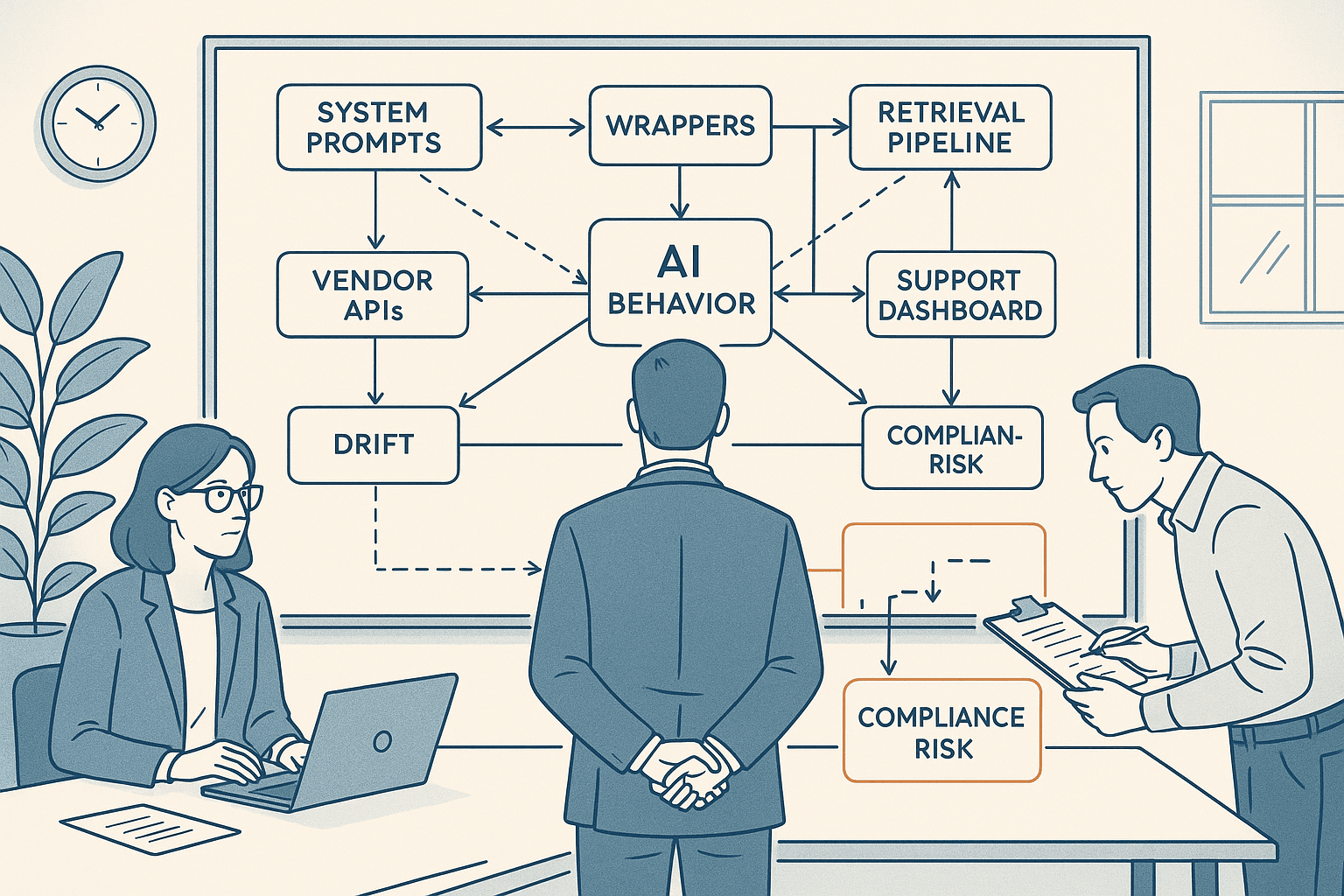
Most startups think they are “using an LLM.” In practice, they are operating a distributed instruction stack made up of vendor defaults, wrapper prompts, hidden middleware rules, retrieval logic, memory injectors, formatting constraints, policy filters, orchestration code, environment-specific configs, and ad hoc edits made by people who do not realize they are changing production behavior.
When the company is small, this feels manageable. A founder can jump into the prompt field, tweak wording, and move on. But as soon as AI touches support, sales, research, internal ops, and customer-facing workflows, the organization loses a clean mental model of what actually causes output behavior. That loss of control shows up as inconsistent tone, uneven compliance, trust erosion, unrepeatable bugs, and eventually a much bigger problem: you cannot reliably explain why the system said what it said.
For a startup, that is not an abstract governance issue. It becomes a revenue issue, a support quality issue, a security issue, and if you operate in a regulated or enterprise environment, a contract issue.
This article is the tactical playbook for fixing it before it turns into an impossible mess.
The pattern: your AI behavior is not one prompt, it is a supply chain
Founders often inherit a dangerously simple picture of AI control:
- We choose the model.
- We write the system prompt.
- We pass user input.
- We get output.
That picture is wrong in almost every production startup stack.
What actually shapes behavior usually includes:
-
Base model behavior
The raw model family and the exact version or dated snapshot. -
Provider-side hidden instructions
Safety layers, policy enforcement, output moderation guidance, function-calling preferences, and routing logic added by the model vendor. -
Platform-level wrapper prompts
If you use tools like Intercom, Zendesk AI add-ons, Gorgias, Salesforce copilots, Notion AI, or research platforms, they often inject their own system instructions around your configuration. -
Your application system prompt
The obvious prompt your team believes is “the prompt.” -
Task-specific sub-prompts
Summarization instructions, extraction templates, qualification logic, RAG answer templates, escalation rules, formatting constraints. -
Retrieval rules
What content is fetched, how it is ranked, what gets clipped, and in what order it appears in context. -
Tool descriptions and function schemas
The names and descriptions of tools strongly influence model decisions. A bad function description often changes behavior more than a prompt tweak. -
Memory and profile injection
User profile data, account metadata, prior conversation summaries, CRM fields, sentiment labels. -
Post-processing rules
Regex cleanup, confidence thresholds, content filters, fallback routing, guardrail services. -
Environment-specific config
Staging vs production prompts, different API settings, sampling differences, old feature flags, region-specific policies. -
Human operator edits
RevOps changes in no-code automations, support ops edits in the helpdesk, PM changes in internal admin panels, engineers updating hardcoded instruction templates.
Once you see the list, the problem becomes obvious: behavior is produced by a chain of dependencies, but most startups assign ownership only to the visible prompt field.
That is the same mistake companies made with software dependencies years ago. They thought they owned their application logic, while quietly importing risk through packages, transitive dependencies, and infrastructure defaults.
Now the same thing is happening with instruction layers.
Why standard advice fails
A lot of generic AI advice boils down to a few ideas:
- “Improve your prompt.”
- “Use a lower temperature.”
- “Add more examples.”
- “Log requests and responses.”
- “Put guardrails around the model.”
None of that is wrong. It is just incomplete to the point of being misleading in a multi-tool startup environment.
1. “Just version your prompts” is too narrow
Versioning the visible system prompt is necessary, but it does not solve the hidden supply chain.
If a support platform injects a default instruction that says “avoid refunds unless confidence is high,” your prompt version control will not capture it. If retrieval ranking changes because your embeddings model changed, your prompt repo will not show the source of the behavioral shift. If a PM edits a tool description in an admin UI, Git will never know.
You need to version the full instruction bundle, not just the obvious prompt.
2. “Standardize on one model vendor” does not remove drift
Even if you use one provider, behavior still varies by:
- model version aliases
- product surface using the model
- region-specific settings
- safety configurations
- tool calling implementations
- wrappers built by vendors on top of the base API
The same provider can produce different behavior across chat UI, API, enterprise platform integration, and third-party wrappers. Vendor consolidation reduces some complexity. It does not eliminate the supply chain.
3. “Use evals” is not enough if you cannot attribute failures
Evals tell you something drifted. They do not tell you where.
Without a map of instruction layers, a failed eval is just a smoke alarm in a building with no floor plan. You know there is a problem; you still do not know whether it came from the model, retrieval, wrapper logic, hidden vendor defaults, or post-processing.
4. “Let each team manage its own AI workflows” scales local speed and global chaos
This is the common startup move. Support owns support prompts. Sales owns outbound tools. Product owns internal assistants. Research builds its own pipeline. Everybody moves fast.
For about three months.
Then customers get contradictory answers. Legal asks for a policy explanation. Enterprise buyers ask how behavior is controlled. Engineering gets dragged into incidents they did not create. Nobody knows who owns cross-cutting consistency.
Decentralized workflow ownership is fine. Decentralized behavioral control with no common operating model is not.
5. “We’ll fix it when it becomes a problem” is expensive because failures are nonlinear
Behavior drift is easy to ignore early because most issues look small:
- one odd support reply
- one bad lead qualification
- one weird summary
- one user reporting inconsistent tone
But these pile up into system-level damage:
- reps stop trusting AI suggestions
- support managers disable automations
- enterprise customers notice policy inconsistency
- internal teams create manual workarounds
- incident debugging time explodes
This is one of those operational problems where waiting multiplies cost.
A better approach: treat AI behavior like an operational supply chain
The fix is not “prompt engineering discipline.” The fix is to create an operational control plane for AI behavior.
That sounds heavyweight. It does not have to be.
For a startup, an operational control plane means five practical things:
- Map every instruction layer that can affect outputs
- Assign ownership for each layer
- Version non-obvious dependencies, not just prompts
- Continuously compare behavior across environments and surfaces
- Create a change-management path for AI behavior just like code or pricing
The goal is not to slow the company down. The goal is to preserve speed while making behavior explainable.
If you can answer these questions quickly, you are in decent shape:
- What instructions influenced this output?
- Which environment produced it?
- Which retrieval documents were included?
- Which tool schema and descriptions were active?
- Which vendor defaults or wrapper layers were involved?
- Who approved the last behavior change?
- Can we reproduce the same output path in staging?
If you cannot answer those within an hour, you do not control production AI behavior. You are renting it from a maze.
The implementation playbook
Let’s make this concrete.
Step 1: Build a system prompt bill of materials
You need the AI equivalent of a software SBOM: a System Prompt Bill of Materials.
For every AI workflow in production, document:
- workflow name
- business owner
- technical owner
- user-facing surface
- model provider
- exact model version
- vendor/platform wrapper used
- visible system prompt
- hidden platform prompt, if known
- retrieval source(s)
- retrieval ranking logic
- chunking strategy
- tool/function descriptions
- memory/profile fields injected
- moderation or guardrail layers
- post-processing logic
- fallback behavior
- environment differences
- change history
Create one row per workflow at minimum. If a workflow is complex, break it into stages.
Example workflows:
- support auto-draft replies
- refund policy answer bot
- SDR outbound email drafting
- call summary generation
- lead qualification classifier
- internal policy Q&A assistant
- market research summarizer
- recruiting feedback summarizer
- finance ops extraction bot
You can start this in Airtable, Notion, Sheets, or a real config registry. The important thing is not the tool. It is the habit of exposing hidden dependencies.
A simple starting schema
Use a table like this:
| Field | Example |
|---|---|
| Workflow ID | support-refund-assistant |
| Team | CX |
| Business owner | Head of Support |
| Technical owner | Applied AI engineer |
| Surface | Intercom macro assistant |
| Vendor stack | Intercom + OpenAI API + Pinecone |
| Model | gpt-4.x dated version |
| System prompt repo ref | prompts/support/refund/v12 |
| Wrapper prompt | Intercom AI policy block v3 |
| Retrieval corpus | Refund policy docs + past exceptions |
| Retrieval config | top_k=5, reranker=on |
| Tool definitions | escalate_ticket(), cite_policy() |
| Memory injection | account_tier, order_age, region |
| Guardrails | PII redaction, legal policy filter |
| Post-processing | confidence threshold <0.7 routes to human |
| Staging parity | no, uses older retrieval index |
| Last change | 2026-08-12 RevOps wrapper update |
| Approval required | CX + Legal |
This one document will surface more risk than most teams realize.
Step 2: Map instruction layers in execution order
Most teams document components but not sequence. Sequence matters because instruction priority matters.
For each workflow, draw the execution path from user input to final output.
A typical path might look like:
- User message arrives in support platform
- Platform injects vendor safety/system instructions
- Internal wrapper injects brand and refund handling rules
- Conversation summary and account metadata are injected
- Retrieval fetches policy and account-specific docs
- Tool descriptions are attached
- API call is made to model X with settings Y
- Output is scored by moderation and confidence rules
- Low-confidence outputs route to human review
- Final text is formatted and sent to agent UI
This sounds obvious, but many companies have never written it down. Once they do, they immediately find duplicate instructions, contradictory rules, stale retrieval corpora, and surprise wrappers.
What to look for
As you map execution order, look for four failure patterns.
Contradiction
Example: the system prompt says “be concise and practical,” while the platform safety layer says “be cautious and comprehensive,” producing bloated replies.
Shadow policy
Example: legal restrictions are hardcoded into a no-code automation prompt but not documented in the official policy.
Retrieval dominance
Example: the prompt is fine, but top-ranked documents are outdated exception cases that overpower the base instructions.
Tool bias
Example: a tool called reject_lead() with a strong description causes the model to overuse it, even though the system prompt says to qualify conservatively.
Step 3: Assign explicit ownership by layer
This is where startups usually resist because it feels bureaucratic. It is not. It is how you stop ambiguous incidents.
Ownership should exist at three levels:
Workflow owner
Responsible for the business outcome of the workflow.
Example: Head of Support owns support reply quality.
Behavior owner
Responsible for the instruction stack and evaluation quality.
Example: applied AI lead or product manager for the workflow.
Dependency owners
Responsible for specific layers like retrieval corpus, policy documents, no-code wrappers, or tool schemas.
Example:
- RevOps owns Salesforce prompt wrapper
- Knowledge manager owns support policy corpus
- Engineering owns function schema and orchestration code
- Security owns redaction rules
- Legal owns regulated response constraints
If nobody owns a layer, that layer will drift silently.
RACI example for a support AI workflow
| Layer | Responsible | Accountable | Consulted | Informed |
|---|---|---|---|---|
| System prompt | Applied AI engineer | Head of Support | Legal, PM | Support ops |
| Retrieval corpus | Knowledge manager | Head of Support | CX ops | Support agents |
| Wrapper logic in Intercom | CX ops | Head of Support | Eng | AI team |
| Model/version selection | Engineering | CTO | Applied AI | Product |
| Guardrail policy | Security | CTO | Legal | All owners |
| Eval suite | Applied AI | Head of AI/Product | Ops | Leadership |
When an incident happens, this avoids the all-hands blame fog.
Step 4: Version the non-obvious dependencies
This is the core operational shift.
Most startups version prompts in Git and leave everything else scattered across SaaS UIs and undocumented settings. That is exactly how you get impossible debugging.
You need to version:
- prompt templates
- tool descriptions and schemas
- retrieval config
- corpus versions or snapshots
- chunking logic
- reranking settings
- model version pinning
- moderation thresholds
- post-processing rules
- no-code wrapper exports
- environment-specific flags
Practical ways to do this without overbuilding
Option A: Git + config files
Good for engineering-heavy teams.
Store workflow configs as YAML or JSON:
prompt_versionmodel_versionretrieval_indextool_schema_versionguardrail_policy_versionwrapper_export_version
Pros:
- auditable
- reviewable in PRs
- integrates with CI
Cons:
- harder when major behavior lives inside vendor UIs
Option B: Registry in Airtable/Notion + scheduled exports
Good for mixed technical/non-technical teams.
Create a canonical registry and require owners to log changes. Use scripts or screenshots/exports for vendor-managed prompts.
Pros:
- accessible to ops teams
- fast to implement
Cons:
- weaker enforcement
- easier to bypass
Option C: Internal control plane service
Good once AI is mission-critical.
Build or adopt a service that stores prompt bundles, tool configs, retrieval references, experiment flags, and deployment metadata centrally.
Pros:
- strongest control
- proper staging/prod promotion paths
- reproducibility
Cons:
- engineering cost
- overkill too early
For most startups, the right path is A or B now, then C later.
Step 5: Detect drift between environments and surfaces
A huge source of pain is believing staging equals production when it does not.
Common differences:
- staging uses a different corpus snapshot
- production uses a newer model alias
- an internal tool uses direct API calls while the customer-facing tool goes through a SaaS wrapper
- support platform injects hidden instructions not present in local tests
- rate limits cause fallback model routing only in production
You need behavioral parity checks.
Minimum viable drift detection
For each critical workflow, maintain:
- a gold test set of representative inputs
- expected output characteristics, not just exact text
- captured metadata for each run
- side-by-side execution across environments
Instead of checking exact response matching, test dimensions like:
- policy adherence
- refusal behavior
- tone consistency
- tool use correctness
- citation quality
- escalation behavior
- formatting compliance
Example drift test
Input: “Customer in EU requests refund after 45 days citing delayed shipment and says prior rep promised exception.”
Run this through:
- local API harness
- staging support workflow
- production support workflow shadow mode
Capture:
- model version
- prompt bundle hash
- retrieval docs used
- tool calls attempted
- moderation outcomes
- final disposition
If the local harness recommends an exception, staging asks for human review, and production declines outright, you do not have one workflow. You have three.
Step 6: Log instruction provenance, not just messages
Most teams log inputs and outputs. Helpful, but not enough.
You also need to log the provenance of the instruction stack for each run.
At minimum, log:
- workflow ID
- environment
- timestamp
- model name and exact version
- system prompt version/hash
- wrapper version/hash
- retrieval index version
- IDs of retrieved documents
- tool schema version
- guardrail policy version
- post-processing version
- user/account metadata fields included
- fallback path taken, if any
This gives you an answer to the essential debugging question: what exact configuration produced this behavior?
Without provenance logging, every incident turns into speculation.
Step 7: Create a promotion path for behavior changes
Behavior changes should move through environments with explicit promotion, not random edits in production.
A lightweight startup flow:
- Proposed change opened by owner
- Change tagged by type:
- prompt wording
- policy rule
- retrieval corpus
- tool schema
- model version
- wrapper config
- Required reviewers assigned based on type
- Eval suite runs
- Staging signoff
- Production rollout with monitoring window
- Incident rollback path defined
Not every change needs the same scrutiny.
Suggested review levels
Low risk
- wording changes in internal summarization tools
- formatting changes
Medium risk
- retrieval ranking tweaks
- tool description changes
- sales qualification prompts
High risk
- customer-facing support policy changes
- regulated advice workflows
- legal or financial guidance tools
- model vendor/version changes in production
This is no different from pricing changes or permissions changes. Some behavior edits are operationally significant and should be treated that way.
Tool comparisons: what each category hides from you
The right operating model depends partly on your tool stack. Different tools hide different layers.
1. Direct API stack
Examples:
- OpenAI API, Anthropic API, Google Gemini API, open-source model serving
- custom orchestration in your backend
Pros:
- maximum visibility
- version control is easier
- better provenance logging
- easier eval integration
Cons:
- more engineering work
- you own guardrails and routing
- more burden on product/ops coordination
Best for:
- core product workflows
- high-stakes customer-facing behavior
- teams with real engineering capacity
Hidden risk:
- teams think visibility equals control, but retrieval and tool schemas still drift internally
2. SaaS wrappers and vertical AI tools
Examples:
- support platforms with AI layers
- sales engagement tools with AI drafting
- meeting assistants
- document copilots
Pros:
- fast deployment
- good UX out of the box
- lower engineering overhead
Cons:
- hidden prompts
- limited observability
- weak environment parity
- vendor-side changes can shift behavior
Best for:
- non-core workflows
- early experimentation
- low-risk augmentation
Hidden risk:
- behavior feels “configured” rather than “engineered,” so nobody applies software discipline
3. No-code orchestration layers
Examples:
- Zapier, Make, n8n, Airtable automations, Retool admin flows
Pros:
- fast iteration by ops teams
- great for glue workflows
- accessible beyond engineering
Cons:
- prompt sprawl
- weak change control
- poor centralized visibility
- easy production edits
Best for:
- lightweight internal workflows
- prototypes
- low-stakes task automations
Hidden risk:
- these become shadow production systems surprisingly fast
4. Internal control plane / prompt management platforms
Examples:
- homegrown prompt registry
- config services
- specialized prompt/eval management tools
Pros:
- governance and reproducibility
- stronger review process
- environment promotion support
Cons:
- requires adoption discipline
- can become process theater if not tied to incidents and evals
- may not reach hidden vendor wrappers
Best for:
- scaling beyond a few workflows
- enterprises or startup teams selling into regulated buyers
Hidden risk:
- a control plane is only real if teams cannot bypass it casually
A realistic workflow example: support, sales, and internal research
Let’s walk through a startup with three AI surfaces.
Support assistant
- Intercom AI layer
- custom policy retrieval via Pinecone
- direct API fallback for complex cases
- support ops can edit macros and some instructions
Sales copilot
- Salesforce notes summarization
- outbound drafting via a sales engagement platform
- lead qualification through a Zapier workflow with an LLM step
Research assistant
- internal web app
- direct API usage
- Notion knowledge base retrieval
- PM-owned prompt templates
On paper, leadership thinks the company has “three AI workflows.”
In reality, it probably has 12 to 20 behavior layers spread across vendors and owners.
A practical first pass would be:
- inventory all user-facing AI outputs
- identify execution paths and hidden wrappers
- capture owner, model, prompts, retrieval, tools, guardrails
- create a gold eval set per workflow
- add provenance logging where technically possible
- freeze high-risk production edits outside the review path
Within two weeks, this company would likely discover:
- support and sales use different account metadata labels for “enterprise customer,” causing different exception behavior
- sales qualification uses a stale industry exclusion prompt in Zapier
- research retrieval includes archived policies without recency weighting
- staging support tests never hit Intercom’s actual wrapper layer
- PM changes to internal prompt templates are not announced anywhere
That is the hidden supply chain becoming visible.
Cost and time analysis: what this actually takes
Founders need realism, not governance fantasy.
Here is a practical estimate for a startup with 5 to 15 meaningful AI workflows.
Phase 1: inventory and mapping
Time:
- 3 to 7 days of one operator or PM
- 2 to 5 hours from each workflow owner
- 4 to 10 hours from engineering for architecture clarification
Cost:
- roughly $3,000 to $12,000 in internal time depending on seniority
Output:
- workflow inventory
- instruction-layer maps
- owner assignment
- top risks identified
This phase pays for itself the first time you avoid a multi-week debugging spiral.
Phase 2: versioning and provenance basics
Time:
- 1 to 3 weeks for one engineer plus ops support
Cost:
- roughly $8,000 to $30,000 internal time
- minimal software cost if using existing tools
Output:
- prompt/config registry
- change log process
- basic provenance metadata logging
- staging/prod comparison harness for critical workflows
This is the highest ROI phase.
Phase 3: evals and promotion workflow
Time:
- 2 to 6 weeks depending on workflow complexity
Cost:
- $15,000 to $60,000 internal time
- possibly vendor/tooling cost for eval or observability platforms
Output:
- gold test sets
- behavior drift detection
- risk-based approvals
- rollback path
Not every startup needs full maturity here immediately. But if AI touches customer decisions or regulated content, get serious fast.
What happens if you do nothing?
The cost is usually hidden in labor and trust.
You pay in:
- engineering incident time
- support QA overhead
- lower adoption from internal teams
- lost confidence from enterprise buyers
- customer confusion from inconsistent responses
- compliance review pain
- delayed launches because nobody can certify behavior
The trap is that these costs show up in different departments, so nobody sees the total.
A control model that works for startups
Do not copy big-company AI governance theater. Startups need a thin but real model.
Use this structure:
1. One cross-functional AI operations owner
This can be a product lead, applied AI lead, or strong operator. They own the registry, review process, incident response coordination, and drift monitoring.
2. Workflow owners stay decentralized
Support owns support outcomes. Sales owns sales outcomes. Research owns research outcomes.
3. Central standards for high-risk layers
Define common expectations for:
- model pinning
- provenance logging
- prompt/config versioning
- retrieval documentation
- eval minimums
- production change approvals
4. Risk tiers
Do not apply the same process to an internal brainstorm bot and a customer-facing refund assistant.
Suggested tiers:
- Tier 1: internal low-risk copilots
- Tier 2: internal decision support and sales drafting
- Tier 3: customer-facing support and policy workflows
- Tier 4: regulated or compliance-sensitive outputs
As tier rises, review and logging requirements rise.
The hardest part: getting teams to admit prompts are product behavior
The political problem is bigger than the technical one.
A lot of startup teams still treat prompt edits like copy changes. They are not. In many workflows, they are policy changes, qualification changes, escalation changes, and customer experience changes.
That means:
- PMs need to treat prompts as product behavior
- ops teams need to treat no-code prompt edits as production changes
- engineers need to expose hidden dependencies rather than acting like the visible prompt is sufficient
- leadership needs to require explainability for high-risk workflows
Until that cultural shift happens, your supply chain will remain hidden.
Common anti-patterns to kill immediately
“The prompt lives in someone’s notes doc”
Unacceptable beyond prototype stage.
“We use the vendor default unless there’s a problem”
That means you do not know what behavior you outsourced.
“Staging is close enough”
If wrappers, retrieval, or model versions differ, it is not close enough.
“Ops can tweak it anytime because it’s just words”
Words are logic when models execute them.
“We can’t document it because the stack changes too fast”
Fast-changing systems need more operational clarity, not less.
A 30-day startup action plan
If you want to get control quickly, do this over the next month.
Week 1: inventory and risk rank
- list every workflow producing meaningful AI output
- tag by business criticality and compliance sensitivity
- identify user-facing vs internal-only
- assign workflow owner and technical owner
Week 2: map instruction layers
- document model, wrappers, prompts, retrieval, tools, memory, filters
- identify environment differences
- note vendor-managed hidden layers where known
- flag undocumented no-code automations
Week 3: add control basics
- create a prompt/config registry
- require change logging for production edits
- pin model versions where possible
- add provenance metadata logging for top workflows
Week 4: set operating rhythm
- create gold test cases for top 3 high-risk workflows
- run staging vs production comparisons
- establish review levels by risk tier
- define rollback owner and incident path
At the end of 30 days, you will not have perfect control. But you will have something much more valuable: a shared operational map.
That map is what makes future speed safe.
The takeaways
The system prompt supply chain problem is not really about prompts. It is about hidden behavioral dependencies.
Startups lose control of AI behavior when they assume the visible system prompt is the main thing shaping outputs. In production, behavior is usually the result of multiple instruction layers spread across vendors, wrappers, retrieval pipelines, internal tools, and operational edits.
The consequence is not just messy prompt management. It is inconsistent customer experience, compliance risk, trust erosion, and debugging that becomes nearly impossible because nobody can reconstruct what actually happened.
The fix is operational:
- build a bill of materials for each AI workflow
- map instruction layers in execution order
- assign ownership by layer
- version non-obvious dependencies
- log provenance for every run
- test for drift across environments and surfaces
- require promotion and review for behavior changes
If AI matters to your startup’s support, sales, research, or internal ops, then instruction supply chain management is now part of running the company.
Founder to founder: deal with this before the first enterprise customer, before the first serious policy incident, and before your own teams stop trusting the systems you built.
Because once AI behavior becomes inconsistent across surfaces, the real damage is not one bad answer. It is that nobody can tell which invisible layer made it happen.