
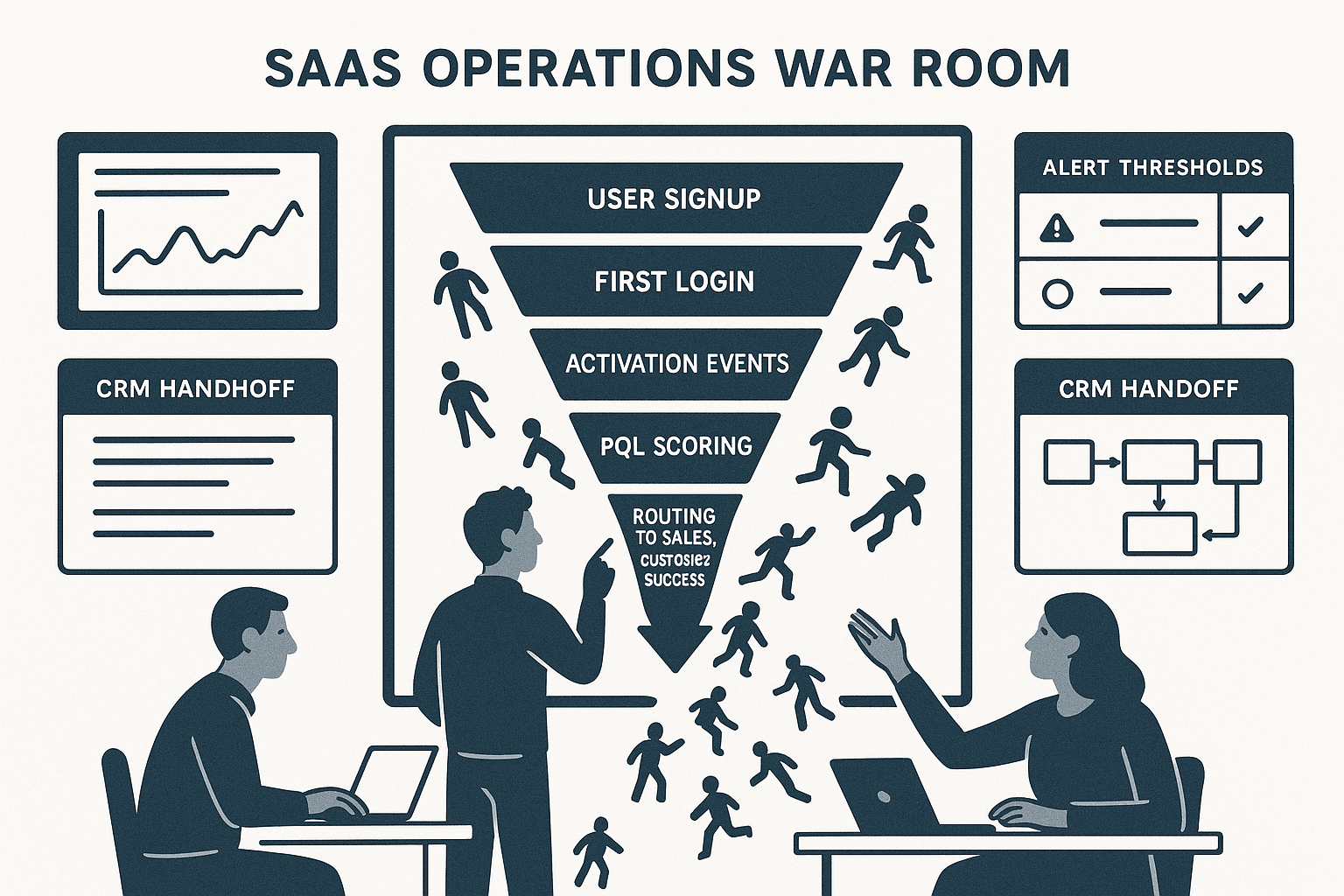
A familiar failure pattern looks like this: a promising account signs up for a trial on Tuesday morning. The user has a company email, not Gmail. They invite two teammates within the first hour. They connect a data source the same day. Someone from engineering hits your docs five times. A VP-level title appears in the CRM enrichment data by afternoon. By any reasonable founder instinct, this account is live.
But nothing happens.
No one on the team gets alerted because the trial events aren’t wired correctly. The lead score stays low because your CRM only knows about form fills, not product behavior. Sales doesn’t reach out because the account hasn’t crossed the old MQL threshold. Customer success assumes sales owns it because the company is above your enterprise employee count cutoff. Product assumes the self-serve flow is good enough because the user technically activated. Three days later, the champion loses momentum. A week later, the trial expires. Two weeks later, they buy from a competitor whose AE showed up at exactly the moment internal urgency peaked.
This is not a lead generation problem. It is not strictly a product problem. And it is not just a sales execution issue.
It is a trial operations problem.
The trial ops gap is the invisible layer between "a user started doing meaningful things in the product" and "the company responded in a coordinated way." Early-stage B2B startups routinely underinvest here because the problem sits between functions. Product builds onboarding. Growth drives signups. Sales chases demo requests. CS waits for closed-won deals. RevOps is either one part-time operator or a founder with a spreadsheet. Meanwhile, your most valuable trial accounts are moving through a self-serve system that has no reliable mechanism for noticing, interpreting, and routing buying intent.
If you are running any hybrid motion, product-led acquisition with sales assist, free trial with enterprise upsell, self-serve onboarding with human conversion support, this layer matters more than most founders realize. You do not need a giant RevOps team to fix it. But you do need a deliberate operating model.
The pattern behind the leak
Most teams describe this problem imprecisely. They say things like:
- "We have good trial volume but conversion is inconsistent."
- "AEs complain they get poor-quality PQLs."
- "Users activate but don’t buy."
- "We don’t know when to reach out during the trial."
- "The product team says onboarding is fine, but sales says the best accounts go dark."
Those are symptoms. The underlying pattern is usually some combination of six operational failures.
1. You track activity, not buying signals
A lot of startups instrument generic product events: signed up, logged in, created project, invited teammate, clicked integration page. Useful, but incomplete. Those are activity markers, not necessarily purchase intent.
A buying-signal event model answers harder questions:
- Did the account reach the moment where your product became valuable?
- Did they touch the setup steps that correlate with paid retention?
- Did multiple stakeholders enter the trial?
- Did anyone with budget or authority show up?
- Did they interact with enterprise-only features or constraints?
- Did trial behavior suggest urgency, complexity, or a near-term rollout?
If you do not know which events separate curiosity from active evaluation, your downstream routing will be noisy.
2. Your PQL definition is either too soft or too clever
Teams commonly fail in one of two ways.
The first failure: "A PQL is anyone who does X." Example: created one dashboard, imported one CSV, invited one teammate. This is easy to implement and almost always low quality.
The second failure: an elaborate weighted scoring model with 40 attributes nobody trusts. The founder, the PM, and sales all interpret the score differently. Reps stop looking at it.
A useful PQL model is narrow, observable, and operational. It should tell a human team: "This account is worth touching now, and here is why."
3. Routing rules are ambiguous
Even when you identify a good account, ownership is murky.
Does a 200-person company on trial go to SDR, AE, founder, or CS? What if they haven’t requested a demo? What if they activated but only one user is active? What if it is a target account but below the usage threshold? What if it is product-qualified but in a geography without rep coverage?
When routing logic lives in people’s heads, follow-up becomes inconsistent and political.
4. The trial environment is optimized for signups, not evaluation
This is a big one. Many startups think trial conversion is mostly messaging and outreach. In reality, the environment itself often prevents serious buyers from reaching confidence.
Examples:
- Sample data makes the product look easy, but masks the actual setup work.
- Integration limits block real evaluation until too late.
- Roles and permissions are absent, so enterprise stakeholders cannot test safely.
- Trial users cannot simulate production workflows.
- The workspace does not guide multi-user adoption.
- Security, admin, and procurement questions surface only after the user wants to buy.
A self-serve trial that is too shallow creates false positives. A trial that is too constrained suppresses high-intent accounts before sales ever sees them.
5. Alert thresholds are either nonexistent or overwhelming
I see two common setups.
Setup one: no alerts at all. Someone has to manually inspect usage or wait for a demo request.
Setup two: Slack spam. Every event from every account triggers something. Within two weeks the team mutes the channel.
An alert system should create urgency around a small number of high-signal conditions, not narrate the entire product.
6. CS and sales handoffs are designed for closed deals, not live trials
In hybrid B2B motions, some of the most valuable work happens before a deal is formally open. But most teams only define handoffs after opportunity creation or close.
That means no one owns:
- onboarding rescue for stalled strategic trials
- technical validation for complex accounts
- expansion of single-user trials into buying committees
- post-demo reactivation inside the product
- account planning during trial, before a commercial process exists
The result is predictable: momentum dies in the space between functions.
Why the standard advice fails
The internet offers three pieces of common advice here, and all three are incomplete.
"Just improve onboarding"
Better onboarding helps, but it does not solve the operational layer. Even a strong onboarding flow will not automatically:
- identify procurement-ready accounts
- distinguish students from serious buyers
- route strategic accounts to the right person
- coordinate product data with CRM context
- trigger timely human intervention
If your product is even moderately collaborative, technical, or workflow-heavy, conversion depends on both product experience and organizational response.
"Let product-led growth stay self-serve"
This is usually ideology disguised as strategy. In B2B, especially above a certain ACV, buyers do not always raise their hand when they need help. They explore privately, test constraints, bring in colleagues, and only talk to vendors when they think the conversation will be useful.
If you force all interest through a demo-request gate, you miss people. If you refuse to assist because you want purity in the funnel, you also miss people.
The right question is not self-serve versus sales-led. It is: where does human help increase conversion without adding friction or cost that breaks the model?
"Have sales monitor product usage"
In practice, this rarely works. Raw product data is noisy. Reps are not analysts. If an AE has to inspect five tools to decide whether an account matters, they won’t do it consistently.
You need packaging, not just visibility. Product intent must be translated into workflows sales and CS can execute.
A better approach: build a trial ops system, not just a trial funnel
Think of trial ops as a compact operating system with five layers:
- Instrumentation: capture meaningful account-level behaviors
- Qualification: define clear PQL criteria tied to buying intent
- Routing: assign ownership based on account type and behavior
- Intervention: trigger the right human or automated action at the right time
- Handoff: transfer context cleanly between product, sales, and CS
You do not need enterprise-grade infrastructure to do this. A startup can implement a strong version with a product analytics tool, CRM, enrichment, messaging, and a few workflows.
The key is to design from decisions backward.
Ask: what decisions do we need to make during a trial?
Usually those decisions are:
- Is this account worth human attention?
- Who should own it?
- What action should happen now?
- What context does the owner need?
- When do we escalate, reroute, or disengage?
Once you know the decisions, the data model becomes much clearer.
Implementation details
Here is the practical playbook.
1. Define the account states inside the trial
Most startups only track user lifecycle states: signed up, activated, converted. That is too coarse.
Define account-level trial states that reflect operational reality. For example:
- New Trial: workspace created, no meaningful setup complete
- Setup Started: first integration/configuration step completed
- Activated: reached core value event
- Multi-Threaded: 2+ active users or 2+ departments engaged
- High Intent: met PQL threshold
- Stalled: no meaningful progress for X hours/days after setup start
- Expansion Potential: usage suggests team/enterprise fit
- Sales Engaged: owner assigned and outreach initiated
- CS Assist Active: onboarding or technical help in progress
- Disqualified: student, competitor, micro-fit, unsupported use case
These states matter because they let you build workflows and accountability around the account, not just the individual user.
Workflow example
A 150-person fintech company signs up.
- Day 0: New Trial
- Day 0: Setup Started after connecting data warehouse
- Day 1: Activated after first scheduled workflow runs successfully
- Day 1: Multi-Threaded after 3 users invited
- Day 1: High Intent after admin role used and security docs visited
- Day 1: Sales Engaged via AE task + Slack alert
- Day 2: CS Assist Active after AE requests technical onboarding call
Without states, this account just looks like "active usage." With states, it becomes operable.
2. Instrument events that matter to purchase, not just usage
This is where most trial ops projects either become too broad or stay too shallow.
Start with three event buckets.
Bucket A: Setup events
These tell you whether the account is getting into real evaluation.
Examples:
- workspace_created
- first_user_verified
- integration_connected
- data_source_connected
- domain_verified
- team_invited
- role_assigned
- project_created
- sample_data_disabled
Bucket B: Value realization events
These indicate the account has experienced the core value proposition.
Examples depend on your product, but think in terms of outcomes:
- first_report_generated
- first_workflow_run_success
- first_alert_fired
- first_document_published
- first_api_call_in_production_like_context
- first_end_user_action_completed
If you cannot define this layer clearly, you probably do not yet understand your activation mechanics.
Bucket C: Buying-intent events
This is the underbuilt layer in most stacks.
Examples:
- invited_multiple_stakeholders
- admin_or_owner_role_assigned
- security_page_viewed
- pricing_page_viewed_in_app
- enterprise_feature_clicked
- export_limit_hit
- usage_cap_warning_triggered
- sales_contact_page_visited
- support_chat_started_with_eval_question
- integration_attempt_failed_on_plan_constraint
- procurement_email_domain_detected
- repeat_sessions_3_days_in_row
- technical_docs_deep_visit
These do not all need to be user-facing clicks. Some can be derived conditions.
For example:
multi_user_eval = active_users >= 3 within 72 hoursstakeholder_diversity = users from technical + business functionsserious_setup = integration_connected AND sample_data_disabled
Instrument at the account level
A classic mistake is keeping all behavior at the user level. Buying decisions happen at the account level.
One user may sign up, another may invite teammates, a third may review admin settings. If your systems do not roll this up into an account object, high intent gets fragmented.
At minimum, your account object should include:
- company domain
- account/workspace ID
- employee band
- industry
- owner/segment
- active users count
- key setup milestones completed
- value event timestamp
- PQL status
- last meaningful activity
- open opportunity status
- current trial owner
3. Create a simple, trusted PQL definition
Your first PQL model should be explainable in one minute.
A strong starting template:
An account becomes a PQL when it satisfies:
- Fit criteria: ICP match based on company size, industry, geography, or use case
- Activation criteria: completed at least one core value event
- Intent criteria: demonstrated at least two buying-signal behaviors
Example:
- Company size > 50 employees
- Connected a production-relevant data source
- Completed first workflow run
- Invited 2+ teammates OR viewed security/admin pages OR hit a plan limit
That is enough to start.
Avoid hiding all judgment inside a score. If you do use scoring, keep it subordinate to explicit rules.
Good PQL example
A PQL is an account that:
- matches ICP tier A or B
- completed integration setup
- achieved first successful output
- shows one collaboration signal and one commercial/administrative signal
That is legible.
Bad PQL example
Lead score > 67 where logins are worth 3 points, invites 7 points, pageviews 1 point, and security pageviews 4 points unless company size is unknown.
No rep trusts that.
Review PQL quality weekly
For the first 8 weeks, inspect every PQL manually.
Ask:
- Did sales agree this was worth outreach?
- Did the account respond?
- Did it create pipeline?
- Did low-quality accounts slip in?
- Did obvious high-intent accounts fail to qualify?
Founders often over-automate before they have observed enough examples.
4. Build deterministic routing rules
Once an account qualifies, ownership should not require debate.
A practical routing model uses three inputs:
- Segment: SMB, mid-market, enterprise, strategic
- Behavior: activated, high-intent, stalled, expansion-potential
- Need type: commercial, technical, onboarding, support
Example routing rules
- SMB PQL under 100 employees → lifecycle email + pooled SDR review only if intent signals are strong
- Mid-market PQL 100–1000 employees → assigned AE within 15 minutes, auto-task and Slack alert
- Enterprise target account regardless of demo request → named AE + founder/SE alert if multi-threaded
- Activated but stalled strategic account → CS/onboarding specialist outreach with setup help
- Product usage suggests technical blocker → solutions engineer queue
- Existing customer trialing new workspace/product → CSM owns with AE visibility
The biggest thing to avoid is mixed ownership.
If sales owns commercial conversion, CS should not independently start qualification conversations. If CS owns trial rescue for strategic accounts, that role should be explicit. If founders want visibility on named accounts, define when they get looped in.
Routing SLA example
For tier-1 PQLs:
- alert in under 5 minutes
- owner assignment in under 15 minutes
- first outreach in under 60 minutes during business hours
- second channel attempt within 24 hours
- technical assist option offered by day 2 if setup complexity detected
The point is not perfection. The point is making delay visible.
5. Design the trial environment for real evaluation
A lot of conversion problems blamed on follow-up are actually trial design failures.
Ask yourself: can a serious buyer answer the real purchase questions inside the trial?
Those questions are usually:
- Will this work with our data/workflow?
- How hard is setup?
- Can my team collaborate here?
- Is this secure/admin-friendly enough?
- What happens at larger scale?
- Can we show internal stakeholders something credible quickly?
Your trial environment should help them answer yes.
Practical design principles
Minimize fake success
Sample data is useful for orientation, but do not let users confuse fake value with real deployment. Encourage transition to real data quickly. Track when they do.
Unlock enough to validate, not enough to absorb unlimited support
Founders often go too far in one direction.
- Too open: users consume expensive resources without buying
- Too locked down: high-intent accounts cannot evaluate and silently drop
A good compromise is to open the setup path and one meaningful value loop, while gating scale, advanced controls, or production rollout.
Support multi-user evaluation
If your product is collaborative, a single-user trial is structurally misleading. Add prompts and workflows for inviting stakeholders, assigning roles, and sharing outputs.
Surface enterprise questions earlier
If security, permissions, admin controls, and integrations matter to purchase, make them visible during trial. Not necessarily fully unlocked, but legibly present.
Build "sales-assisted self-serve" hooks
Examples:
- contextual prompt after plan limit hit: "Need a larger dataset or SSO for evaluation? Talk to our team"
- admin page note: "We can help configure roles for your evaluation workspace"
- setup stall message after failed integration: "Get technical help"
These are not generic demo CTAs. They are situation-specific escape hatches.
6. Set alert thresholds that matter
Your team should get interrupted only for conditions that warrant action.
A useful alert system has three classes.
Class 1: Qualification alerts
Trigger when an account becomes worth human attention.
Examples:
- account becomes PQL
- target account reaches activation
- existing open opportunity shows strong product re-engagement
Class 2: Risk alerts
Trigger when a valuable account may stall or churn from trial.
Examples:
- ICP account started setup but no value event within 24 hours
- invited users never activated
- integration failed twice
- no activity 48 hours after high-intent burst
Class 3: Expansion/escalation alerts
Trigger when the account outgrows self-serve assumptions.
Examples:
- user count exceeds trial design norm
- usage cap hit by ICP account
- enterprise/security features viewed repeatedly
- cross-functional usage detected
Alert payload template
Do not send bare event names. Send context.
Every alert should include:
- account name and domain
- segment/ICP tier
- current state
- key events that triggered alert
- active users count
- owner or queue
- recommended next action
- link to account view in CRM or analytics
Example:
PQL Alert: Acme Financial
Tier A | 220 employees | Mid-market fintech
Triggered by: data warehouse connected, first workflow successful, 3 users active, security docs viewed
Current owner: Unassigned
Recommended action: AE outreach offering technical eval support
That is actionable. "event: workflow_success" is not.
7. Build explicit CS/Sales handoffs for trial-stage work
This is where startups either gain leverage or create chaos.
Not every trial-stage interaction belongs to sales. Not every product issue belongs to support. And not every setup problem should wait until post-sale onboarding.
Define trial-stage roles clearly.
Suggested role split
Sales/AE owns:
- commercial qualification
- discovery of team, budget, timeline
- stakeholder mapping
- procurement path
- packaging evaluation into buying process
CS/onboarding owns:
- setup acceleration
- workflow configuration guidance
- activation rescue
- use-case validation
- helping users reach first success
Solutions engineer or technical founder owns:
- integration troubleshooting for strategic accounts
- architecture/security deep dives
- advanced technical validation
Handoff triggers
Examples:
- AE requests CS assist after PQL qualifies but setup complexity is blocking progress
- CS escalates to AE when second department joins or buyer role appears
- support escalates to sales when a plan limit or enterprise requirement emerges
- founder joins when named strategic account goes high-intent
Handoff packet
Every handoff should carry the same minimum context:
- account background and ICP tier
- trial state
- key completed milestones
- blocker summary
- stakeholders identified
- commercial signals observed
- next recommended action
- exact owner and SLA
Without this, handoffs become context reset points, which kills momentum.
Tool comparisons: what to use without building a monster stack
You do not need the perfect stack. You need a coherent one.
Here is a practical view.
Product analytics / event infrastructure
PostHog
- Pros: flexible, relatively affordable, good for early teams, event capture + product analytics in one place
- Cons: can get messy without discipline, requires thoughtful schema design
- Best for: startups that want control and decent technical flexibility
Mixpanel
- Pros: strong product analytics UX, good funnels/cohorts, easier for non-technical teams to inspect behavior
- Cons: cost can climb, may still need work to sync operational workflows well
- Best for: teams prioritizing product behavior analysis and PM/Growth usability
Amplitude
- Pros: mature behavioral analytics, robust analysis capabilities
- Cons: can be overkill early, expensive at scale
- Best for: later-stage teams or those already deep in analytics rigor
Segment + warehouse model
- Pros: central governance, flexible downstream destinations
- Cons: more implementation overhead, easy to delay impact while architecting
- Best for: teams with existing data maturity
My practical advice: if you are early, choose the simplest system your PM, founder, and GTM lead will actually use weekly. Operational trust matters more than theoretical flexibility.
CRM and routing
HubSpot
- Pros: startup-friendly, decent automation, easier cross-functional adoption
- Cons: account-level complexity can get awkward if you outgrow basic workflows
- Best for: seed to Series A teams wanting speed
Salesforce
- Pros: maximum flexibility, stronger enterprise RevOps patterns
- Cons: admin overhead, expensive mistakes if poorly configured
- Best for: teams with established RevOps support or enterprise-heavy motion
Alerts and internal workflows
Slack + CRM tasks
- Pros: fast, cheap, good enough for most early-stage teams
- Cons: easy to create notification fatigue, weak auditability if used alone
- Best for: first implementation stage
Customer.io / Braze / lifecycle messaging tools
- Pros: useful for contextual trial nudges and fallback automation
- Cons: can become another disconnected layer if not tied to account state
- Best for: combining product behavior with triggered messaging
Dedicated orchestration tools
- Pros: more sophisticated branching and sync logic
- Cons: often too much too early
- Best for: when volume and complexity clearly justify them
Cost and time analysis
Founders usually ask whether this is a two-week cleanup or a six-month RevOps project.
If you keep scope tight, a credible first version is usually a 3–6 week effort.
Lean implementation plan
Week 1: event and state definition
- identify activation event
- identify 5–10 buying-intent signals
- define account states
- draft initial PQL logic
People needed: founder/GTM lead, PM or product engineer, sales lead
Time cost: 6–10 total working hours across team
Week 2: instrumentation audit
- review current event schema
- map missing events
- ensure account-level rollups exist
- confirm company/domain identity stitching
People needed: product engineer, data/analytics owner, PM
Time cost: 1–3 engineering days depending on current hygiene
Week 3: routing and alert setup
- define segment ownership
- build Slack alerts and CRM tasks
- establish SLA expectations
- create basic account view/dashboard
People needed: GTM ops owner, sales lead, CS lead
Time cost: 1–2 ops days
Week 4: trial environment improvements
- add contextual assist prompts
- fix one or two high-friction setup points
- expose admin/security/scale cues earlier
People needed: PM, designer, engineer
Time cost: 2–5 product days depending on complexity
Weeks 5–6: calibration
- manually review every PQL
- tune thresholds
- inspect missed accounts
- revise playbooks and handoffs
People needed: founder or GTM lead, AE/CS stakeholders
Time cost: ongoing, 30–60 minutes daily plus weekly review
Rough software cost bands
For an early-stage startup:
- analytics: $0–$1.5k/month depending on scale and tool
- CRM/workflow tooling: often already paid for
- enrichment: $100–$500/month if needed
- messaging/alerts: minimal incremental cost
The bigger cost is not software. It is focus. Teams avoid this work because it is cross-functional and slightly annoying. But compared with spending another $20k–$100k/month on acquisition, this is often one of the highest ROI fixes available.
If you are generating decent trial volume already, increasing conversion from trial activation to qualified pipeline by even 20–30% usually pays for the effort quickly.
A concrete end-to-end workflow example
Let’s say you sell B2B workflow software with a free 14-day trial and a typical ACV of $8k–$30k.
Day 0
A user from Northstar Health signs up with a corporate domain. Enrichment identifies 400 employees, healthcare industry, US-based.
System actions:
- account created in CRM
- segment tagged as mid-market tier A
- default owner queue assigned
- lifecycle onboarding starts
First 2 hours
User connects a real system, disables sample data, creates first workflow.
System actions:
- account moves to Setup Started
- setup completion score updates
- no human alert yet
Hour 4
Second user invited. First workflow runs successfully. User visits permissions page.
System actions:
- account moves to Activated
- account becomes Multi-Threaded
- permissions-page event logged as buying signal
Hour 5
Third user joins from IT. Security docs opened from within app.
System actions:
- PQL threshold reached
- Slack alert sent to AE queue
- CRM task created with context
- AE assigned under routing rules
- trial state updated to High Intent and Sales Engaged
AE action
AE sends a short note:
"Saw your team has already connected real workflow data and added IT. Teams at this stage usually want help on permissions and rollout design. Worth a 20-minute working session this week?"
This is better than generic outreach because it reflects actual behavior.
Day 1
Northstar replies. They want to understand role controls and deployment limits.
System/human actions:
- AE qualifies project scope and stakeholders
- CS/onboarding specialist joins 30-minute setup session
- solutions engineer available if SSO/security depth emerges
Day 2
During call, team reveals they need audit logs and more environments. Those are gated.
System/human actions:
- account flagged Expansion Potential
- AE opens opportunity
- CS sends follow-up implementation checklist
- trial environment extended 7 days
That is a coordinated trial ops system.
Now compare with the default startup version: no alert, no owner, no context-aware outreach, no technical assist until a demo request appears. Same product. Very different result.
Common mistakes while implementing this
Mistake 1: overbuilding scoring before understanding behavior
Start with rules. Add scoring later only if needed.
Mistake 2: optimizing for perfect attribution
You do not need a pristine warehouse model before acting. If you can identify high-intent accounts with 80% confidence and route them reliably, start there.
Mistake 3: sending too many accounts to sales
If reps lose trust in PQL quality, the system dies. It is better to start narrow and expand.
Mistake 4: treating trial rescue like support
High-value stalled trials are not just tickets. They are pipeline at risk.
Mistake 5: ignoring non-converting high-intent accounts
Study them. Some of your best operational insights come from accounts that should have bought but did not. Did they hit setup friction? Need missing admin controls? Fail to form a buying committee? Get reached too late?
Mistake 6: letting product and GTM define success differently
Activation, PQL, and pipeline creation should be visibly connected. If product celebrates one-user activation while sales needs multi-stakeholder evaluation, you will keep working at cross-purposes.
What to measure once this is live
Do not just track trial-to-paid at the top line. Measure the operational chain.
Key metrics:
- trial accounts created
- ICP trial rate
- setup-start rate
- activation rate
- multi-user evaluation rate
- PQL rate
- PQL-to-meeting rate
- PQL-to-opportunity rate
- time from qualifying signal to first outreach
- stalled-high-intent rescue rate
- conversion by route type: self-serve only vs sales-assisted vs CS-assisted
- conversion by trial environment variant
- false-positive PQL rate
- false-negative review count
One especially useful metric: time-to-human-help for high-intent accounts. If the answer is "we don’t know," you likely still have a gap.
The operating principle to keep
The main shift is this: stop treating the trial as a passive funnel and start treating it as a live account evaluation process.
Your highest-intent B2B users are telling you what they need through behavior long before they fill out a demo form. The companies that convert better are not always the ones with the most signups or the slickest onboarding. They are the ones that notice serious evaluation early, respond with context, and coordinate ownership without making the buyer do organizational work for them.
That is what trial ops fixes.
Takeaways
- The trial ops gap is the space between meaningful product behavior and coordinated human follow-up.
- Most leakage comes from weak event design, fuzzy PQLs, ambiguous routing, poor trial environments, noisy alerts, and undefined CS/sales handoffs.
- Standard advice like "improve onboarding" or "let PLG stay self-serve" fails because the real issue is cross-functional execution.
- Build around account states, not just user events.
- Instrument buying signals, not just activity.
- Keep PQL definitions simple, explicit, and trusted.
- Make routing deterministic and fast.
- Design the trial environment for real evaluation, not just signups.
- Alert only on moments that deserve action, and always include context.
- Define trial-stage handoffs before the deal formally exists.
If you are a founder, this is one of those systems that feels operationally boring until you fix it. Then suddenly pipeline quality improves, sales trust goes up, product gets clearer feedback, and trial conversion becomes less mysterious.
That is usually a sign you have finally built the layer your hybrid funnel needed all along.